Tech leads, engineering managers, and developers comparing AI coding tools for real-world work.
What you’ll learn
How Cursor and Claude Code approach coding, where each one works best, and how to decide which is the right fit for you.
AI coding tools are everywhere now, but figuring out which one actually fits your workflow is another story.
I wrote about Cursor a while ago. Since then, Claude Code has taken off (and I’ve switched to it myself) and I see the comparison come up all the time.
The thing is, Cursor and Claude Code look similar at first glance, but there are some clear differences.
In this article, I’ll show you how Cursor and Claude Code behave across key categories like planning, editing, Git workflows, autonomy, and more to help you make the right decision for yourself and your team.
Let’s dive in!
Key takeaways:
Cursor gives you structure and visibility. You see every change as a diff, keep risky edits isolated, and roll out consistent workflows across your team.
Claude Code gives you depth, control, and raw reasoning power. It handles huge contexts, complex refactors, and system-level problems straight from your terminal.
Your workflow decides the winner. Cursor fits teams that want guardrails and shared controls. Claude Code fits developers who want freedom and a powerful operator in the shell.
Before I go deeper, here’s a quick look at how Cursor and Claude Code approach coding at a fundamental level.
Cursor: an AI-first IDE
Cursor reimagines the IDE around agents. It looks like VS Code, but everything inside it centers on AI-driven development.
You get a sidebar for agents, diffs, and plans.
Cursor 2.0 and 2.1 built on that with multi-agent workflows, Composer as its in-house coding model, in-editor code review, Plan mode, and an embedded browser you can hand off to the agent.
It’s now on its 3.x line, and the pace of shipping hasn’t slowed.
Recent additions include Cursor Router, which now powers Auto mode and routes each task to the model that makes the most sense on cost, intelligence, or balance.
Cursor has also added Cursor Projects, where a coordinator agent plans large pieces of work and delegates tasks to subagents, self-hosted machines for running cloud agents on your own infrastructure, and Security Review and Rollouts bots for catching vulnerabilities in PRs and monitoring deployments.
There’s also a full Cursor for iPad app and Cursor Start, a lower-cost plan that’s currently available only in India, at ₹649/month.
The biggest shift, though, is who owns Cursor. In June 2026, SpaceX agreed to acquire Anysphere, Cursor’s parent company, in an all-stock deal worth $60 billion, days after SpaceX’s own IPO.
The deal closed on August 14, 2026, and it’s being reported as the largest venture-backed startup acquisition on record.
It’s already had a knock-on effect for developers: OpenAI is cutting off Cursor’s access to its models on November 12, 2026.
That backing also explains where Cursor’s in-house models get their training compute.
In June 2026, Cursor unveiled Composer 3, a 1.5-trillion-parameter model trained from scratch on SpaceX’s Colossus supercomputer and pitched as frontier-class competition for Claude Opus and GPT-5.5-class models.
As of October 2026, though, Composer 3 still isn’t available in Cursor. Cursor’s own model lineup is Composer 2.5 plus xAI’s Grok models, led by Grok 4.7, which Cursor calls its “most capable model for long-running coding and knowledge work.”
Cursor plugs into your daily workflow. Without leaving Cursor, you can:
Write code
Review changes
Run agents
Inspect diffs
Deploy code
It also isolates risky edits. Each agent works in its own worktree or remote environment, so you can try different solutions safely and compare them side by side.
If you’re leading a team, Cursor also gives you solid governance features.
You can enforce privacy mode, set up SSO, manage hooks, track usage, and align prompts across the team. For remote or fast-growing teams, that kind of consistency can be a lifesaver.
In short, Cursor is a complete AI development environment inside a familiar editor.
Claude Code: AI as a programmable operator
Claude Code takes a different route.
It doesn’t replace your IDE. It runs in your terminal and integrates with VS Code.
The terminal is where most of the action happens with Claude Code.
You talk to your agent, run commands, execute scripts, and let it modify files in place. It sits close to your real toolchain because it’s part of it.
You can run Claude Code from the terminal, a VS Code extension, a JetBrains plugin, a standalone desktop app on macOS and Windows (with a Linux version in beta), a web version at claude.ai/code, or the Claude mobile app on iOS and Android.
Sessions hand off between devices, so you can pick up a task wherever you left it. I use the terminal most days, but I’ve picked up a session on my phone more than once to check on a long-running task.
Claude Code runs on Anthropic’s current model lineup, and that lineup has changed again since this article’s last update. The lineup is now:
Claude Mythos 5.1: restricted to vetted cyberdefenders and life scientists through Anthropic’s trusted access programs.
Claude Fable 5.1: the general-access flagship, built for the most demanding reasoning and long-horizon agentic work.
Claude Opus 5.5: performs at Fable 5.1’s level on most work, costs 40% less to run than Opus 5, and is the model Anthropic recommends starting with for most work.
Claude Sonnet 5.5: the best combination of speed and intelligence, and 30%+ faster than Sonnet 5.
Claude Haiku 5.5: the fastest and cheapest model in the lineup, built for high-volume work like classification, extraction, and routing. It costs about 75% less to run than Haiku 4.5.
Claude Code now defaults to Opus 5.5 on every paid plan. You can switch to Sonnet 5.5 for faster, cheaper work, Haiku 5.5 for quick, simple tasks, or Fable 5.1 for the hardest, longest-running tasks.
Claude Code gives you a set of advanced features that put you in control of how the agent works:
Checkpoints – Claude Code snapshots your files before each prompt, so you can rewind its edits with /rewind. It doesn’t track changes made through shell commands, so treat it as a safety net, not a replacement for Git.
Sub-agents – Specialized helper agents that each run in their own context window, with their own instructions, tools, and permissions. Claude can run several in parallel and hand each one a focused subtask, which keeps the main session’s context clean.
Hooks – Automation triggers you define. They help enforce workflows, validate changes, and run tests without prompting.
Plan mode – Claude reviews the task, prepares a plan, and waits for your approval before touching any files.
Skills – Reusable instructions and workflows packaged as a SKILL.md file, optionally with scripts. Claude loads them automatically when they’re relevant, or you trigger one with a slash command.
Worktrees – Start a session in its own Git worktree with claude --worktree, so parallel tasks don’t step on each other.
And it also has serious automation features that let you do work beyond a single session:
Routines: scheduled cloud automation that can also trigger on API calls or GitHub events, so you can run recurring maintenance or review tasks without sitting at the keyboard. It’s still in research preview.
Channels: push events from Telegram, Discord, iMessage, or webhooks straight into a running Claude Code session, so the agent can react to signals outside your editor. Also in research preview.
Claude Agent SDK: lets you build fully custom agents on top of Claude Code’s engine, if you want to wire it into your own internal tools.
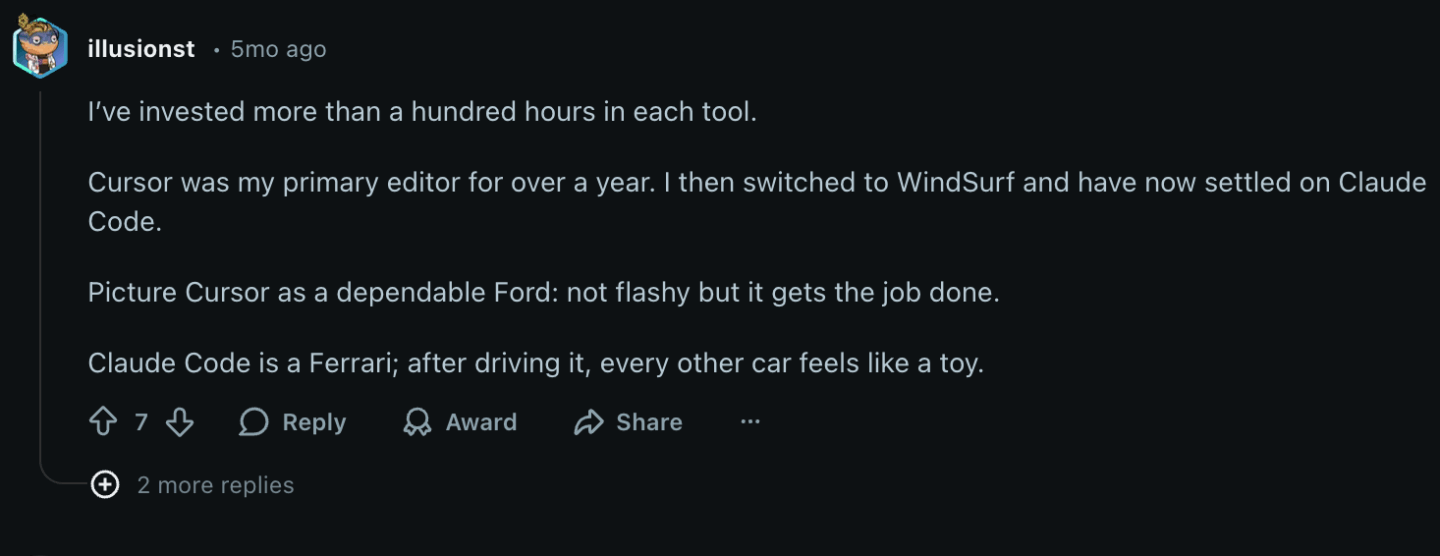
I saw one developer on Reddit sum up the difference between Claude Code and Cursor with a simple metaphor:
In short, Claude Code treats AI like a capable operator working beside you in the shell, the browser, and your phone. It focuses on deep reasoning, flexibility, and low-level control.
If you spend most of your time in the terminal and want a programmable agent, it fits that style well.
Head-to-head comparison: Cursor vs. Claude Code
Next, I’ll compare Cursor and Claude Code head-to-head across the most relevant categories.
Codebase understanding and long-context reasoning
Cursor treats your entire codebase as a searchable, analyzable workspace.
Its agent searches your repo on demand and uses what it finds to answer questions, plan changes, and generate diffs.
That gives you strong codebase comprehension paired with clear visibility into what the agent reads, changes, and proposes.
You get several advantages from this approach:
Instant Grep – A custom search engine that Cursor says outperforms ripgrep on large codebases. It builds its index locally on your machine, which makes agent-driven search almost instant, even in large monorepos.
Project-wide edits – Cursor can update multiple files at once, and you see everything in side-by-side diffs. You stay fully in control of large refactors.
Multi-model flexibility – You can run Cursor’s own models, like Grok 4.7 or Composer 2.5, for most tasks, or switch to an external model like Claude Opus 5.5 or Gemini 3.1 Pro when you want a different reasoning style.
Cursor is at its best when you want clarity, diffs, and a clear view of how AI-driven edits affect your repo.
As for Claude Code, like I mentioned earlier, it runs on Anthropic’s long-context models. Opus 5.5, Sonnet 5.5, and Fable 5.1 all come with a 1 million token context window by default, with no long-context surcharge, meaning they can handle massive inputs without losing structure.
They’re strong at reasoning across many files, patterns, and dependencies at once, which is crucial in big or legacy codebases.
You also get benefits from the terminal-first flow:
Context-rich execution – Claude Code runs commands, builds, and tests as part of its reasoning loop. That gives the model live feedback about how your system behaves.
MCP extensions – You can attach MCP servers to expose additional tools or structured context. This expands what the agent can understand about your environment.
Checkpoints for safety – Claude’s file edits can be rewound, so Claude Code can attempt large, multi-step modifications with a quick way back. Changes made through shell commands aren’t covered, so keep Git in the loop.
In practice, this means that Claude Code shines when you need deep, uninterrupted reasoning.
Large feature migrations, cross-cutting refactors, architecture improvements, and complex debugging all play to its strengths.
So, if your priority is long-context understanding across a huge system, Claude Code usually goes further than Cursor.
My verdict: Claude Code.
Claude Code goes deeper on long-context reasoning, large-scale refactors, and architecture-level work in big or legacy codebases.
A default 1M-token context window on Opus 5.5 and Sonnet 5.5 is a real jump from where Anthropic’s models were a year ago, and it shows in how far Claude Code can go on a single pass through a large or legacy system.
For codebase understanding and long-context reasoning, Claude Code takes the edge.
Planning, agents, and autonomy
Both tools support agentic workflows, but they approach it differently.
Cursor spreads work across independent agents, while Claude Code runs one main session that delegates focused subtasks to sub-agents, each with its own context window.
The core differences are easiest to see side by side. Here are the key differences between Cursor’s multi-agents and Claude Code’s sub-agents:
Cursor multi-agents vs. Claude Code sub-agents: overview
Feature
Cursor: multi-agents
Claude Code: sub-agents
Core idea
Independent agents that run in parallel
A main agent that delegates focused subtasks to specialized helpers
Context sharing
Each agent has its own isolated context
Each sub-agent gets its own fresh context window and reports results back to the main agent
Repo model
Use separate worktrees or remote environments
Same working directory by default, or an isolated Git worktree per sub-agent
Task structure
Explore multiple strategies or directions
Break one complex task into smaller subtasks
Model usage
Each agent can run a different model
All sub-agents use Claude models
Parallelism
True parallel execution across agents
Sub-agents can run in parallel, coordinated by the main agent
Ideal for
Migrations, experiments, and risky edits
Deep reasoning and coordinated refactors
Cursor’s multi-agents are a good fit when you want breadth, variation, and safer experimentation.
They act like multiple developers tackling the same problem with different approaches.
Claude Code takes a different path. It uses a single main agent supported by sub-agents.
The main agent owns the plan and hands each sub-agent a focused piece of it, so the work stays coordinated even though each helper works in its own context.
My verdict: Claude Code.
Cursor gives you breadth, parallel strategies, and strong isolation between agents. Claude Code gives you one structured plan, coordinated helpers, and deep reasoning in the main session.
If you want to explore and have several alternatives, Cursor fits better. If you want one deeply reasoned path with a clear plan, Claude Code is the better choice.
Editing, safety, and version control
Editing is where the two tools feel the most different in day-to-day use.
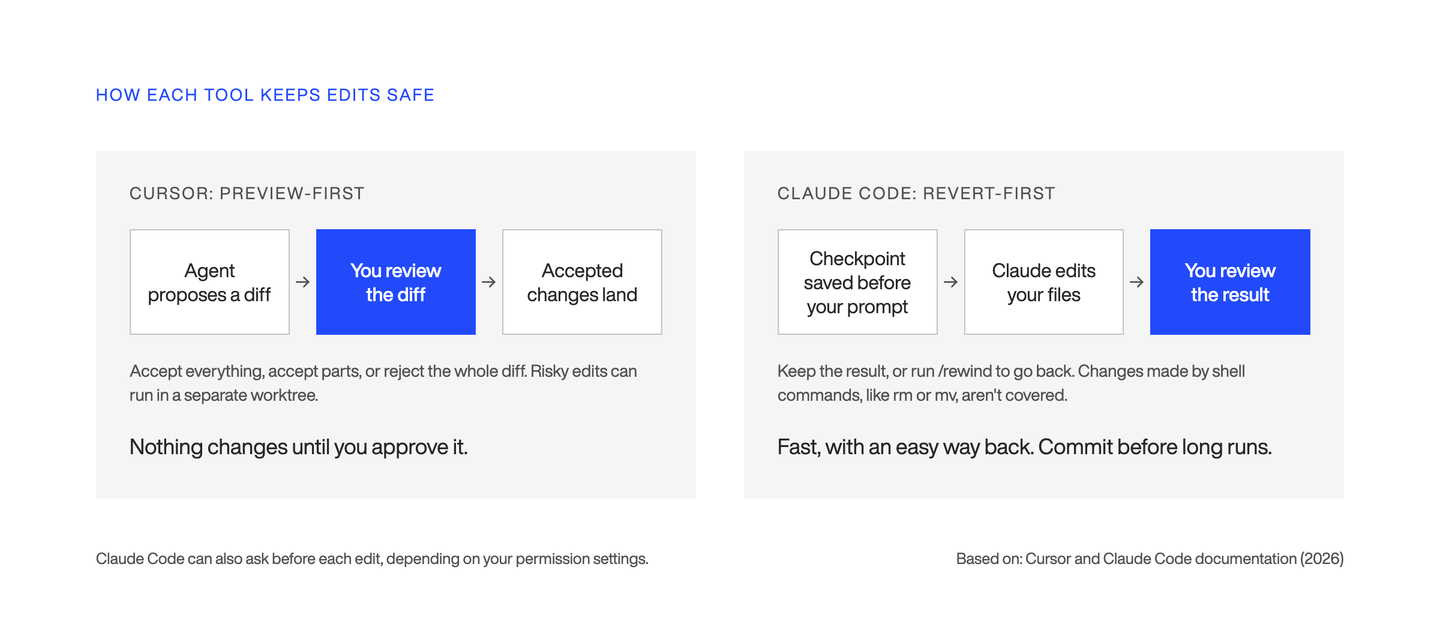
Cursor treats edits as structured diffs inside the IDE. Claude Code treats edits as steps in a reversible sequence of actions in your terminal and editor.
Cursor builds every edit around visibility and safety. You always see what the agent changed and you decide what to accept.
It feels close to reviewing a pull request from another developer.
Here’s what it looks like in practice:
Side-by-side diffs – Every edit appears in a diff view. You can inspect changes file by file before applying them.
Granular acceptance – Accept everything, accept parts, or reject the whole diff. You keep control during large refactors.
Worktree isolation – Risky edits happen in separate worktrees or remote environments. Your main repo stays clean until you merge changes back.
In-editor code review – Cursor shows warnings and issues directly in the editor as you work. It’s separate from Bugbot, but both help you catch mistakes early. Cursor acquired Graphite in December 2025 and has said it plans to combine Graphite’s AI Reviewer with Bugbot, though Graphite still runs as a separate product for now.
Cursor’s workflow feels safe and predictable.
It’s a strong fit if you’re looking for transparency, audit trails, and clean version control.
Claude Code, on the other hand, handles edits a bit differently.
Instead of showing diffs upfront, it saves a snapshot, called a checkpoint, before each prompt you send.
It feels more like pair-programming than reviewing a pull request. Here’s how it works:
Automatic checkpoints – Claude saves a checkpoint before each prompt you send. You can rewind with /rewind or by pressing Esc twice.
Sequential changes – Claude applies edits step by step as it follows the approved plan. You watch the reasoning and actions unfold in order, instead of comparing diffs first.
Live file edits in your workspace – By default, everything happens directly in your local environment. If you want isolation, you can start a session in its own Git worktree with claude --worktree.
Undo-first safety – Because Claude’s file edits are reversible, it can attempt large refactors, multi-step transformations, or loops, like “run until all tests pass”, with an easy way back. Shell commands, like deleting or moving files, aren’t covered by checkpoints, so commit before long autonomous runs.
Claude’s workflow is flexible and fast.
It’s a strong match for senior developers who are comfortable letting the agent move quickly, then rolling back if they don’t like the result.
My verdict: Cursor.
Cursor takes the edge, though the gap is narrower than it used to be. Cursor’s preview-first safety, granular acceptance, and built-in worktree isolation still make it a stronger default for teams, even now that Claude Code supports worktrees too.
Working with real toolchains
Both tools can work with your project’s real toolchain.
They just do it in different ways, and that matters when you’re shipping code, debugging builds, or dealing with infrastructure.
Cursor gives you controlled execution through sandboxed terminals and the extension ecosystem it inherited from VS Code. Claude Code plugs into your actual shell and tools with full access.
Cursor runs your real build and test commands inside each agent’s isolated worktree, so nothing touches your main environment until you merge it back.
In practice, that means an agent can run `pnpm build`, `gradle assemble`, `npm test`, `pytest`, or `go test`, and install dependencies with `npm install`, `pip install`, or `bundle install`, all without leaving its sandbox.
Cursor also gives you:
Support for the full VS Code extension ecosystem, including linters, formatters, and language servers you already rely on.
Docker-based environments for cloud agents, and the option to run them on your own infrastructure, so agents can work inside the same environment your team ships from.
Built-in browser tooling, so agents working on UI changes can open a preview, click through the interface, and check their own work visually before handing it back to you.
Cursor’s approach is security-first. It’s a good fit if you want to move faster but still keep a clear boundary between AI and your local system.
Claude Code, however, integrates directly with your terminal. It can use your tools, scripts, and environment, within the permission rules you set.
That gives you a lot of power, but it also means you need to trust and supervise what it does.
Here’s what it can do:
Running end-to-end test suites – Claude can run something like `npm run test:e2e`. If tests fail, it reads the logs, diagnoses the issue, edits files, and tries again.
Debugging build failures – If mvn package or cargo build fails, Claude sees the real stack traces. It can find the root causes and apply patches directly.
Applying infrastructure changes – Claude can run tools like terraform plan, read the diff, adjust configs, then re-run. Or run kubectl get pods, inspect logs, and apply fixes in the code.
Working with service logs – Claude can tail logs with commands like tail -f services/user-service/logs/app.log then propose code changes based on real runtime behavior.
Multi-step automation – It can run loops such as “Run the test suite until all tests pass, fixing failures as they appear.” You watch it iterate until the build is clean.
Claude Code can drive your tests, builds, infra tools, and debugging workflows with very little friction, as long as you are comfortable giving it that level of access.
My verdict: Claude Code.
Claude Code gives you full integration with your real toolchain, from tests and builds to infra and logs. Assuming you’re okay managing the extra risk.
Model flexibility and performance
Cursor and Claude Code both rely on strong foundation models.
Cursor is not tied to a single model provider. It lets you choose the best model for the task and even mix them across different AI agents.
Here’s an overview of what it offers:
Cursor’s own models – Grok 4.7, which Cursor calls its most capable model for long-running coding and knowledge work, and Composer 2.5. Composer 3, a 1.5-trillion-parameter model Cursor announced in June 2026, hasn’t shipped in Cursor yet.
Third-party frontier models – Claude Opus 5.5, Sonnet 5.5, Fable 5.1, and Haiku 5.5 from Anthropic, Gemini 3.1 Pro and Gemini 3.8 Flash from Google, Meta’s Muse Spark 1.3, and GPT-5.6 Sol, Luna, and Terra from OpenAI, at least until November 12, 2026, when OpenAI cuts off Cursor’s access. You switch models per task or per agent, for example running Opus 5.5 for architecture planning and Grok 4.7 Fast for a quick first pass.
Parallel model comparisons – With multi-agents, you can try the same task across multiple models and pick the best result.
Context windows in Cursor – The default context window varies by model. Max Mode, which extends it further at the model’s API rate plus 20%, is now only available on legacy request-based plans.
Cursor adapts dynamically based on the model you choose.
Claude Code is built on Anthropic’s current models. Opus 5.5, Sonnet 5.5, and Fable 5.1 all come with a 1 million token context window by default, like I mentioned earlier.
They can also generate up to 128,000 output tokens in a single request, and Opus 5.5 and Sonnet 5.5 can go up to 300,000 through the Message Batches API (currently in beta) for long-running tasks. The new Haiku 5.5 has the same 1M context window and output limits, though prompts over 100,000 tokens cost five times more per token.
Here’s why it stands out:
Huge context windows – A 1M-token window lets the model process very large codebases, long chains of logs, or multi-service architectures without splitting the work into chunks.
High output limits – 128,000 output tokens standard means long refactors or multi-file rewrites rarely hit a hard ceiling mid-task.
Deep multi-step reasoning – Claude’s models handle long, coherent reasoning chains well. Things like architecture changes, dependency untangling, or debugging with long logs are where they stand out.
Stable performance at scale – Claude maintains coherence even with massive inputs. This matters for monorepos, legacy systems, or multi-service backend environments.
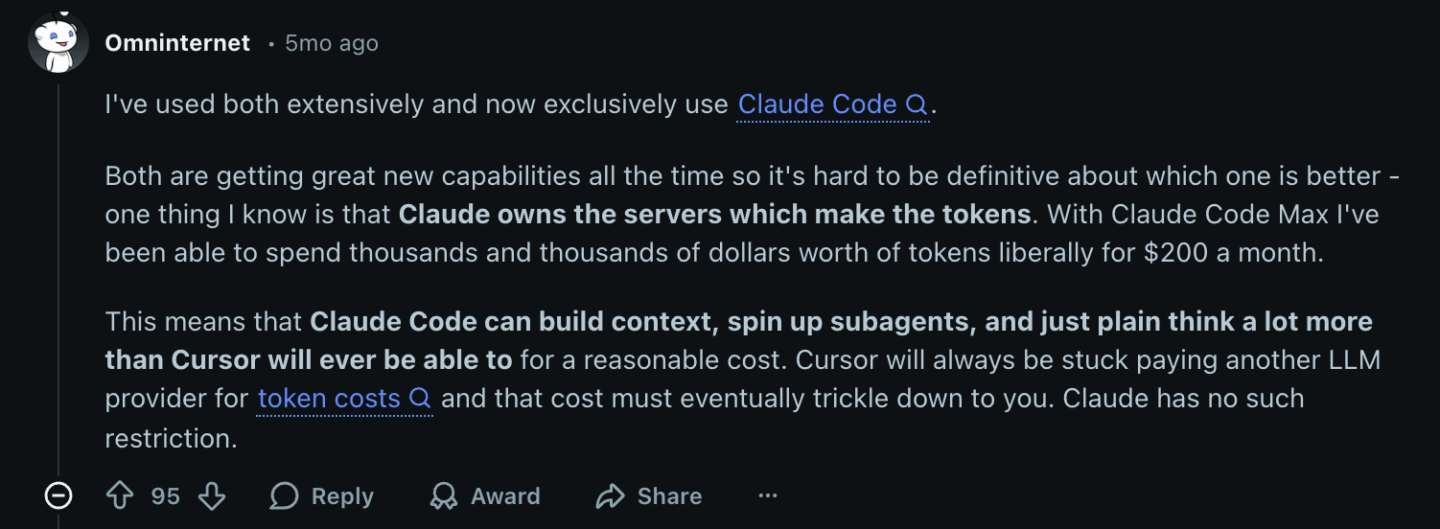
Claude Code’s strength is depth. One Reddit user summed up the practical impact of this pretty well:
So, you get long context, long output, and strong reasoning performance across complex systems, with far fewer token limits to work around.
Long-context runs still eat into your plan’s usage, though, so costs don’t disappear.
My verdict: Claude Code.
Claude Code takes the edge for me on raw capability, though Grok 4.7 has narrowed the gap for Cursor on tasks that don’t need a million-token window.
Cursor gives you a broader choice of models and fast parallel iteration, even after OpenAI’s models leave in November, but Claude Code’s default 1M-token context and 128K output ceiling give it more room to work through large, complex systems in one pass.
Team features and governance
AI tools don’t just need to be smart. They also need to fit how teams actually work.
That means things like access control, handling privacy, auditability, consistency, and rolling out shared workflows across many developers.
Cursor leans into team-wide governance, while Claude Code leans into flexibility and developer freedom though it has picked up more team-relevant features than it used to have.
Cursor is built with teams in mind. It gives engineering managers and tech leads real control over how AI is used across the company.
Here’s what stands out:
Privacy mode (no data retention) – Cursor prevents model providers from storing prompts or code. You can enforce this across the entire team.
SSO and role-based access – Support for enterprise SSO like Okta, Google Workspace, and Azure AD. Admins can define which users get which features. Enterprise plans also support SAML/OIDC and SCIM for automated user provisioning.
Audit logs – Team and enterprise plans include logs that track agent actions, model usage, and who made which changes.
Centralized rules and hooks – You can define shared prompts, coding guidelines, lint rules, or custom tools. Cursor distributes these automatically to every team member.
Usage dashboards – Managers get clear visibility into model consumption, agent usage, and spending.
Bugbot and Security Review – Cursor’s review bots plug into GitHub, GitLab, Bitbucket, and Azure DevOps. Bugbot reviews every PR, and on Teams and Enterprise, Security Review flags exploitable vulnerabilities, which supports consistent code quality across larger teams.
Claude Code takes a different approach. It still puts individual developers’ power and flexibility first, but it now has a real admin layer on top.
Here’s what it offers:
Access across different devices – The terminal, VS Code, JetBrains, desktop, web, and mobile all draw on the same usage pool, so a team can standardize on Claude Code without locking everyone into one interface.
Managed settings – On Team and Enterprise, admins can push organization-wide settings from the Claude admin console, like permission rules, allowed MCP servers, allowed models, and hooks, and developers can’t override them locally.
MCP (Model Context Protocol) – MCP lets teams attach shared tools, contexts, or services, like test runners, documentation servers, or code search engines.
Usage analytics – A Claude Code analytics dashboard shows accepted lines, accept rates, active users, and sessions, and you can export usage data through OpenTelemetry.
Routines and Channels – These give teams a way to standardize recurring automation (scheduled checks, event-triggered runs) and route external signals into sessions. Both are still in research preview, and admins can turn them off.
Code Review – On Team and Enterprise, Claude Code Review runs a fleet of agents over your GitHub pull requests and posts findings as inline comments tagged by severity. It’s in research preview and billed separately, at $15 to $25 per review on average.
Light footprint, easy onboarding – Developers install the CLI and the VS Code extension and can start. It’s low overhead and works well without big process changes.
Claude Code is a good fit for highly autonomous teams.
It gives senior developers freedom and power without locking them into a specific way of working.
My verdict: Cursor.
Cursor gives you privacy controls, SSO, audit logs, usage dashboards, centralized rules, and an integrated review pipeline. Claude Code has closed some of the gap, but if you need team features and governance, especially if you’re running a larger team, Cursor is still the stronger choice.
Github/Gitlab workflows
Cursor integrates deeply with GitHub, GitLab, and other Git platforms. Claude Code does most of its Git work locally, but it now plugs into GitHub and GitLab too, for PR reviews and CI.
Cursor behaves like another engineer in your review pipeline and directly takes part in your review pipeline.
Here’s what that looks like:
Bugbot for automated PR reviews – Bugbot reviews pull requests, flags issues, and leaves comments automatically. It catches logic bugs, missing edge cases, and brittle code paths. If it finds an issue, Bugbot Autofix can spin up a cloud agent to fix it and push the commit for you.
PR-based change proposals – Cursor can generate full pull requests for new features, migrations, or refactors. It creates branches, commits changes, and opens the PR with a summary.
Inline diff explanations – Cursor explains why changes were made, line by line. This helps reviewers understand the reasoning behind large edits.
Safe fixes – If Bugbot suggests changes, you can accept or reject them directly in the PR. That creates a controlled feedback loop inside your normal code review flow.
Automated GitHub Actions integration – Cursor can interact with CI logs, read failing test outputs, diagnose issues, and propose fixes.
Claude Code, on the other hand, does most of its Git work inside your local repo, using your normal Git commands.
On top of that, it connects to GitHub through Claude Code GitHub Actions and its managed Code Review service, and to GitLab through a CI/CD integration that’s currently in beta.
Here’s what that looks like:
Local diffs, local commits – Claude edits files in place in your working directory. You run git diff, git add, and git commit when you’re ready.
Agent-assisted commit messages – Claude can write commit messages, summarize diffs, or structure complex commits. This helps when you have large changes that need clear explanations.
Branching guidance – If you need to create a branch for an experimental refactor, Claude can help set it up and guide your workflow.
Reviewing PRs– Run /code-review on a PR number or branch to review it from your terminal, and add –comment to post the findings straight to a GitHub PR or GitLab merge request. On Team and Enterprise, Code Review can review every PR automatically.
Pipeline debugging – With the Claude Code GitHub Action, you can mention @claude in a PR or issue, and it can read CI results, diagnose flaky tests, dependency issues, or build pipeline errors, and push a fix.
Claude Code’s approach is simple and flexible.
It doesn’t force a new Git workflow on you. It supports the one you already use and adds PR-level automation when you want it.
My verdict: Cursor.
Cursor gives you a PR-aware, CI/CD-aware agent that plugs into GitHub, GitLab, Bitbucket, and Azure DevOps for reviews, fixes, and automated feedback. Claude Code has narrowed the gap with GitHub Actions and Code Review, but if you need clear Git platform workflows and end-to-end PR support, Cursor is still the winner in my book.
Pricing
Pricing can be a deciding factor, especially if you plan to use these tools every day.
Both Cursor and Claude Code offer multiple tiers, and both tie those tiers to usage limits.
Cursor offers several plans, depending on how often you use agents and which team features you need:
Free / Hobby – Basic usage with limited premium AI calls.
Pro – $20/month. Includes a monthly pool of AI credits for agents and premium completions.
Pro+ – $60/month. Comes with a larger monthly credit pool for heavier individual use.
Ultra – $200/month. High-usage plan for power users who run agents constantly, with a much larger credit allowance.
Teams – $40/user/month for a standard seat, $120/user/month for a premium seat. Adds team features such as SSO, centralized billing, shared rules, admin controls, and pooled usage. Third-party models like Claude also carry an extra $0.25 per million tokens on Teams and Enterprise.
Cursor Start – ₹649/month, currently available only in India. It includes Cursor’s own Grok and Composer models and cloud agents, but not Anthropic or OpenAI models, Bugbot, or Auto mode.
Enterprise – Custom pricing. For large organizations that need advanced governance, audit logs, and a tailored setup.
Cursor’s total cost scales with how much you use agents. Heavy Auto Mode, large refactors, or constant multi-agent workflows can push you past the base allowance and into paid overage.
In June 2025, a pricing change from a simple, easy-to-understand Pro plan to a more complex credit model caused backlash.
Some users reported surprise charges and unclear limits, and Cursor later clarified the model and offered refunds to affected customers.
Claude Code uses a somewhat simpler structure on the surface.
You pick a monthly plan based on how often you expect to use the model, and each plan comes with defined usage caps:
Free – Doesn’t include Claude Code. You need at least a Pro plan to use it.
Pro (individual) – $20/month, or $17/month billed annually. Suitable for light to moderate coding use, with a capped number of messages and Claude Code usage in each time window.
Max 5x – $100/user/month. Roughly five times the Pro usage. A better fit for regular use on production code and medium-sized repos.
Max 20x – $200/user/month. Built for daily heavy use, large refactors, and long-context work, with roughly twenty times the Pro usage.
Team Standard Seat – $20/user/month billed annually, or $25/user/month billed monthly, with centralized billing and admin roles.
Team Premium Seat – $100/user/month billed annually, or $125/user/month billed monthly, for teams that need a much larger shared usage pool.
Enterprise – $20/seat/month, billed annually, plus usage at API rates. Includes SSO with domain verification, audit logs, SCIM provisioning, a compliance API, custom data retention controls, and organization-wide spend controls.
These plans don’t just cover Claude Code. They also give you access to the broader Claude experience, including chat and other features.
My verdict: Inconclusive.
Cursor offers stronger team features but has a more complex, usage-driven pricing model that can spike for heavy workloads.
Claude Code offers simpler per-user tiers as part of a broader Claude subscription, but still enforces usage caps and can add extra charges if you go beyond them.
Claude Code’s pricing has been more predictable and less prone to the kind of billing surprises Cursor has had to walk back. If cost predictability matters more to you than model choice, it’s the better choice.
If you want a broader choice of models and don’t mind watching your usage closely, Cursor still gives you more flexibility per dollar.
So, on pricing alone, I can’t say either is a clear winner.
Picking the right tier for your team
If you’re a solo developer or working on side projects, start on Cursor’s free Hobby plan or Claude’s Pro plan, since Claude’s free plan doesn’t include Claude Code. You don’t need enterprise features to find out whether the workflow fits you.
If you’re leading a team of five or more, that’s when the calculus changes.
Cursor’s Teams plan gives you governance and consistency out of the box. Claude Code’s Team plan gives you centralized billing, admin roles, managed settings, and usage analytics, but you’ll still lean on shared configs and team conventions more than you would with Cursor.
If your company has compliance requirements, audit needs, or works in a regulated industry, go straight to Enterprise on whichever tool you pick. The SSO, audit logging, and access controls at that tier are worth the price.
My honest take: don’t focus too much on price per seat when you’re comparing these two. The bigger cost is a team using a powerful agent carelessly and creating unnecessary rework.
Pick based on how well the tool fits your workflow, then use the governance and audit features to keep spending and risk under control.
Combining Cursor and Claude Code in one workflow
You don’t have to pick just one. A growing number of devs I talk to run both, and it works better than you’d expect once you split the work by task type.
This often looks like this: developers use Cursor for the bulk of daily work, like bug fixes, small features, and anything that benefits from a visible diff and quick team review.
They go for Claude Code when a task needs deep, uninterrupted reasoning.
A large migration, an architecture change, or a gnarly cross-service bug all benefit from a million-token context window and a long, unbroken reasoning loop.
Some even run Claude Code inside Cursor, through the Claude Code extension, which installs in Cursor like any VS Code extension. That gives them Cursor’s editor and diff view on top of Claude’s reasoning depth for the parts of a task that need it.
If you’re setting this up for a team, I’d pick one tool as the default for most day-to-day work, so you get consistent governance and review, and treat the other as a specialized tool for the handful of tasks that genuinely need it.
Trying to standardize on both equally just creates two sets of different habits to maintain.
Cursor vs. Claude Code: FAQs
Run a focused 2-4 week trial with a small team.
Pick 2-3 real tasks per tool, like: one large refactor, one feature that uses multiple services, and one messy bug.
Then, define what success looks like up front, with metrics like:
Time to complete
Number of review comments
Defect found post-merge
Rotate the same developers across both tools so you control for skill level and have them keep a short retro doc where they log when the tool helped or got in the way.
This will give you an objective assessment of whether or not they fit your team’s workflow.
They can be, but it depends more on how you configure them than on the tools themselves.
Here’s what you need to keep in mind:
Check where data is processed and stored, and which regions are available.
In Cursor, review privacy mode and data retention settings for your organization.
In Claude Code, decide which repos and environments the agent can reach, and use managed settings to enforce permission rules, MCP servers, and models across the organization.
Involve security and compliance experts early. Give them a test workspace to review logs and behavior.
Factor in vendor risk. Cursor’s change of ownership, and OpenAI pulling its models as a result, shows that the models available in a tool can change with little warning.
Neither tool has a magic “compliant by default” switch. You still need policies, scopes, and access controls around them.
Treat AI adoption like any other dev tooling change. Here’s an example of what you can do:
Start with a small group of 3–5 engineers
Agree on one or two use cases to begin with, like test generation or small refactors
Write a short “how we use AI” page in your engineering handbook (what’s okay, what’s not)
Only then roll it out to more teams, along with a short live demo and a Q&A
If you drop both tools on the whole team at once, you’ll get random usage and random results.
But if you guide usage from the start, you can shape how they fit into your process instead of the other way around.
Conclusion
Cursor and Claude Code take two different paths, but both can change how developers work.
Both can plan, reason, refactor, and run real tasks that save time. If you’re exploring AI for your or your team’s workflow, it’s worth trying both.
I’ve used both extensively and personally, I prefer Claude Code.
With Cursor, I felt I was just approving someone else’s code, especially if I let it run in YOLO mode. But with Claude Code, I get more granular controls and I find it fits my workflow better.
But, there’s no wrong answer here – you’ll quickly find out which one best fits how you think and how your team builds software.
Skilled in React Native, iOS and backend, Toni has a demonstrated knowledge of the information technology and services industry, with plenty of hands-on experience to back it up. He’s also an experienced Cloud engineer in Amazon Web Services (AWS), passionate about leveraging cloud technologies to improve the agility and efficiency of businesses.
One of Toni’s most special traits is his talent for online shopping. In fact, our delivery guy is convinced that ‘Toni Vujević’ is a pseudonym for all DECODErs.
A practical guide to AI test automation tools in 2026. Compare the top platforms by category, see honest pros and cons, and choose what fits your team.
A comparison of top AI code review tools for engineering teams. Evaluation criteria, tool breakdowns, and adoption advice for CTOs and engineering leaders.