Most mid-market companies pick their first AI project in one of two ways: a vendor demo that looked good, or the executive who pushed hardest in the last leadership meeting.
Neither tells you whether the use case pays back, whether your data can support it, or what it’ll cost to run once it’s live.
An AI opportunity assessment answers those questions before you commit a budget.
Guessing is expensive: 42% of companies abandoned most of their AI initiatives in 2025, up from 17% a year earlier.
Working on the engineering side, I’ve learned that the expensive problems rarely show up in the pitch. They show up when someone exports data from the ERP system, or asks who checks the model’s output before a customer sees it.
This is the framework I’d use for a company with legacy systems and manual workflows.
An AI opportunity assessment is a structured review of your operations that finds where AI can create measurable value.
A good AI opportunity assessment ends with two or three use cases worth funding, each with a business case, a run cost and kill criteria. A long list of ideas doesn’t count as a result.
Before you score anything, filter out problems that rules or workflow automation can solve more cheaply.
Score use cases on five criteria: business value, data reality, integration effort, error tolerance, and run cost vs. value.
Data findings based on real records, not interviews
Kill criteria for the pilot, agreed before it starts
A 90-day plan for use case number one
If an assessment can’t produce these, it was a brainstorm with a slide deck.
AI opportunity assessment vs AI readiness assessment
An AI readiness assessment asks whether your organization can run AI at all. An AI opportunity assessment asks which specific use cases deserve funding first.
Vendors often sell one under the other’s name, so check what you’re buying.
AI opportunity assessment
AI readiness assessment
Question it answers
Which use cases should we fund first, and which should we drop?
Can our data, infrastructure, skills and governance support AI?
Output
Scored use cases, business cases, kill criteria, 90-day plan
Gap analysis across data, infrastructure, people and policy
When to do it
You have ideas or pressure to act and need to choose
You suspect basic gaps, like no data platform or no AI policy
For most mid-market companies, I’d run the opportunity assessment and fold readiness into it.
If you check readiness in the abstract, you get a long list of gaps. If you check it against one specific use case, you learn which gaps to close this quarter.
The 6-step AI opportunity assessment framework
The six steps run in order.
Together they cover the five root causes RAND identified behind failed AI projects: misunderstood problems, missing data, tech-first thinking, weak infrastructure and problems AI can’t solve.
Step 1: Inventory processes by cost, not by AI potential
Start with your most expensive processes, then ask where AI might help.
Go team by team and record hours spent per week, error rates, delays and the cost of a mistake. Ask every process owner one question: what does this cost us a year?
I don’t open with “where could we use AI?”
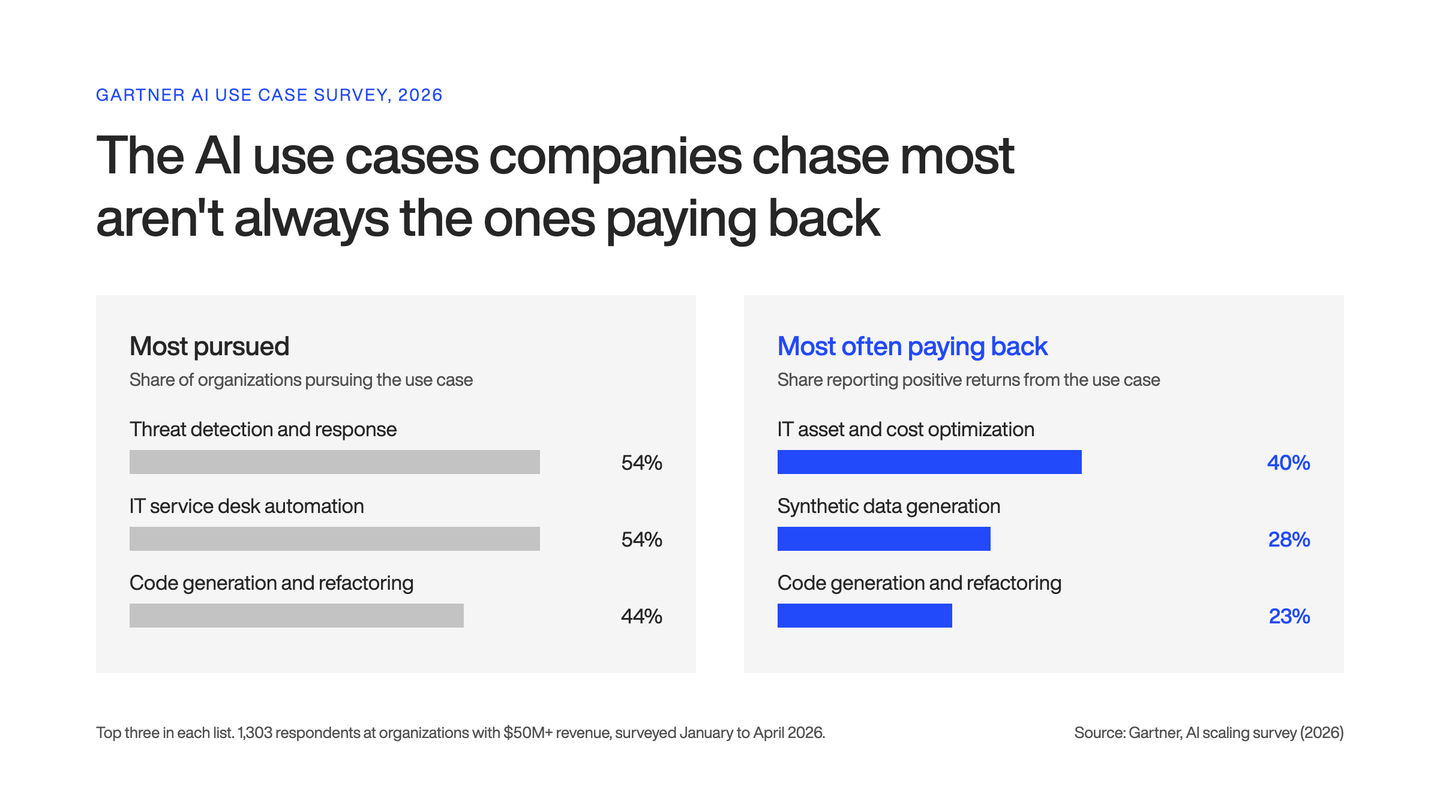
That question gets you a list of things people saw in demos. Gartner found that the most-pursued use cases often aren’t the ones with the highest returns.
Step 2: Check whether the problem needs AI at all
Before you score a candidate, put it through a three-way filter:
Rules or workflow automation: the inputs are structured and the logic fits in a decision table, like routing orders by region and weight.
Classic machine learning (ML): you need predictions from historical numbers, like demand or equipment failure.
Large language models (LLMs): the inputs are unstructured, like emails, scanned delivery notes, contracts or conversations.
Deterministic software (code that gives the same output for the same input every time) is cheaper to build and easier to test, and it doesn’t drift. I count every idea that lands in this bucket as a win for the assessment.
Step 3: Score each use case on five criteria
Score every remaining use case from 1 to 5 on the criteria below. On every criterion, 5 is the good end.
Criterion
What it measures
A 1 looks like
A 5 looks like
Business value
Annual cost or revenue at stake, measured, not guessed
A gut feeling with no baseline
A measured, significant annual cost
Data reality
The data exists, you can reach it and it’s clean enough (checked in Step 4)
Data lives in inboxes and people’s heads
Clean, accessible records with history
Integration effort
Systems it connects to, and whether they have application programming interfaces (APIs)
Writes into a legacy ERP with no API
Reads and writes through documented APIs
Error tolerance
Cost of a wrong output, and who catches it
Wrong output reaches a customer unchecked
A person reviews every output and mistakes are cheap
Run cost vs. value
Inference, monitoring and maintenance as a share of annual value
Run cost eats most of the value
Run cost is a small fraction of the value
One reading rule matters more than the total. A 1 on data reality or error tolerance parks the use case, whatever it scores elsewhere. Don’t let a high value score average those away.
For mid-market companies, integration is usually the hardest constraint. The model is the easy part.
Getting it to read from a 15-year-old ERP and write back without breaking month-end close is where the budget goes.
Step 4: Test the data before you trust the score
Before you finalize any score, run a one- or two-day data spike on real records.
A data spike is a short, hands-on test: an engineer pulls the data and checks it instead of asking people whether it exists. For each shortlisted use case:
Pull 200 to 500 real records, including the messy ones, not a sample someone picked for you
Count missing fields, and free-text fields that should be structured
Check how you’d reach the data: API, database, nightly export or someone’s spreadsheet
Check whether you know the right answer for past cases, so you can measure the model later
When someone tells me “we have the data,” I treat it as a hypothesis.
Gartner expects organizations to abandon 60% of AI projects that lack AI-ready data through 2026. Rescore data reality and integration effort after the spike, because both often drop.
Step 5: Build the business case with run cost and kill criteria
Write a one-page business case for each shortlisted use case, and include what it costs to run after go-live. Most estimates stop at the build.
The recurring costs are:
Inference or token costs (what you pay the model provider each time the AI runs), which grow with usage
Monitoring and evaluation, so you know when quality slips
Updates when a provider changes or retires a model
A named owner who keeps it running
About one in five organizations say operating or token costs limit their AI use.
Measure your KPI baseline now too, while the process still runs manually. Without a baseline, you can’t prove anything later.
Then write the kill criteria, for example: “Stop if the pilot can’t extract the required fields from 85% of delivery notes without manual correction by week eight.”
I like to set these before the pilot starts. Once it’s running, sunk cost starts making the case for you.
Step 6: Pick the first project for speed of proof, not size of prize
Choose the use case that can show a measured result fastest, even if another one has a bigger upside.
A good first project has internal users, a person reviewing outputs, one main system integration and a result within 90 days.
According to BCG, AI leaders pursue about half as many opportunities as their less advanced peers and expect more than twice the return on investment (ROI). I’d follow that discipline.
Your first project’s job is to earn trust and teach your team how AI behaves in production. The big customer-facing idea can wait a quarter.
AI use case prioritization in practice: a worked example
This example is illustrative.
Picture a hypothetical 400-person logistics company with three warehouses, an on-premise ERP, a transportation management system (TMS) and drivers who hand in signed paper delivery notes after every route.
Use case
Value
Data
Integration
Error tolerance
Run cost
Total
Verdict
Proof-of-delivery (POD) extraction from signed delivery notes
4
4
3
4
4
19
Build now
Warehouse staffing forecast
4
2
3
4
4
17
Later: fix data first
Customer chatbot quoting prices and delivery dates
5
3
2
1
3
14
Later: parked on error tolerance
Driver CV screening
2
3
3
1
4
13
Kill
Carrier assignment by lane and weight
n/a
n/a
n/a
n/a
n/a
n/a
Not AI: use rules
The total ranks the list, but the gates and the Step 2 filter decide it:
POD extraction wins, and it’s the only row with nothing below a 3. Delivery notes come back as scans and phone photos, the kind of unstructured input where an LLM earns its place over rules. The model reads the consignee, date, quantities, damage notes and whether a signature is present, then writes them into the ERP or TMS. An operations clerk reviews only the low-confidence extractions.
The chatbot has the highest value score and still gets parked. A wrong price or delivery date goes straight to a customer.
Carrier assignment never gets scored. A decision table handles it for a fraction of the cost.
Driver CV screening is low value, and the EU AI Act treats AI used in recruitment as high-risk.
I wouldn’t score POD extraction any higher.
Integration stays at 3 because writing into a legacy ERP is never trivial. Data stays at 4 because phone photos vary in quality, which is exactly what the data spike should test.
Clerks already type these fields in by hand, so their past entries give you known right answers for an evaluation set.
The staffing forecast comes close, and fixing its data could move it to the top of next quarter’s list.
What changes in a generative AI opportunity assessment
Generative AI adds four checks that a classic assessment misses. Build them into Steps 3 to 5 for any use case that relies on an LLM:
An evaluation set: 50 to 100 real examples with known correct answers, built during the assessment. Without one, nobody can say whether the model is good enough.
A hallucination budget: how often a wrong answer is acceptable, and who catches it. This sets the error tolerance score.
A privacy decision: where the data goes, and whether you need models that run locally or inside the EU.
An EU AI Act risk class: transparency obligations have applied since August 2, 2026. Annex III high-risk uses, like recruitment and credit scoring, follow from December 2, 2027.
I’d classify every use case by risk during the assessment. Finding out after the build that you’ve made a high-risk system is an expensive surprise.
Common AI assessment questions to ask your team
The most useful AI assessment questions are about cost, data and failure. These ten do most of the work in the first week:
1. Which process costs us the most time or money every year?
2. How do we measure that cost today?
3. Where does the data for this process live, and who can export it?
4. How much of it is free text, scans or spreadsheets?
5. Could a fixed set of rules handle most cases?
6. What happens when the output is wrong, and who notices?
7. Which systems would this need to read from and write to?
8. Who owns the process, and will they change how they work?
9. What would make us stop the pilot?
10. Does this touch hiring, credit or other regulated decisions?
If a process owner can’t answer the first three, the use case isn’t ready for scoring.
How long an AI opportunity assessment takes and what it costs
At DECODE, discovery and readiness work like this typically costs EUR 15k to 50k.
Scope sets the price: how many departments you include, how many systems the data spike touches and whether you want a working prototype at the end.
I see the assessment as insurance. The average organization scrapped 46% of proofs of concept before production, and a focused AI feature with us usually costs EUR 80k to 150k.
A few weeks of DECODE’s AI opportunity assessment costs far less than building the wrong thing.
What to do after the assessment
Start use case number one within a few weeks, while the data findings are fresh and the process owner is still engaged.
Put the kill-criteria review dates in the calendar on day one.
Then rescore the parked list every quarter. Data improves, model prices drop, and a “later” can become a “build now.”
At DECODE, senior engineers who’ve built and shipped AI features in production run our assessments.
Their scores reflect what it takes to integrate with your ERP, keep run costs in check and handle your data securely.
We’re ISO 27001 certified. For sensitive data, we can run models locally on Spark, our in-house AI workstation, so nothing goes to external AI providers during testing.
Mario makes every project run smoothly. A firm believer that people are DECODE’s most vital resource, he naturally grew into his former role as People Operations Manager. Now, his encyclopaedic knowledge of every DECODEr’s role, and his expertise in all things tech, enables him to guide DECODE's technical vision as CTO to make sure we're always ahead of the curve.
Part engineer, and seemingly part therapist, Mario is always calm under pressure, which helps to maintain the office’s stress-free vibe. In fact, sitting and thinking is his main hobby. What’s more Zen than that?
Agentic AI consulting helps teams design, test, and ship AI agents that hold up in production. Here's the 8-part framework we use, from evals to rollout.
Lemon.io CEO Aleksandr Volodarsky on the software engineer skills that matter in the AI era, why senior demand doubled, and the skills software engineers should focus on building.