Your inbox is full of promises. “Automate everything.” “Your team could save 10 hours a week.” “No code required.”
Some of that is true, sure.
A lot of it glosses over the parts that actually matter, like what happens when your CRM doesn’t talk to your ERP, your data is scattered across dozens of spreadsheets, and you have no one on the team who’s ever built a workflow in their life.
If this rings a bell, you’re in the right place.
In this article, I’ll show you what AI business automation actually looks like for a non-technical team.
We’ll talk about which processes are worth targeting first, which tools can genuinely do the job without a developer, and how to avoid the mistakes that sink most automation projects.
Key takeaways:
Start where human judgment adds the least value. The best first automation target isn’t the most painful process. It’s the most rule-based one: high volume, clear steps, measurable output, and a failure that won’t affect your customers if something goes wrong.
The bottleneck is almost never the technology. Messy data, unclear process ownership, and teams that weren’t prepared for the change sink more automation projects than choosing the wrong tool ever could.
No-code and custom development aren’t competing options. Most businesses need both, applied to different parts of the problem. The real work is figuring out where the line sits.
Business automation gets used to describe everything from a simple email notification to a full machine-learning pipeline, and the differences matter.
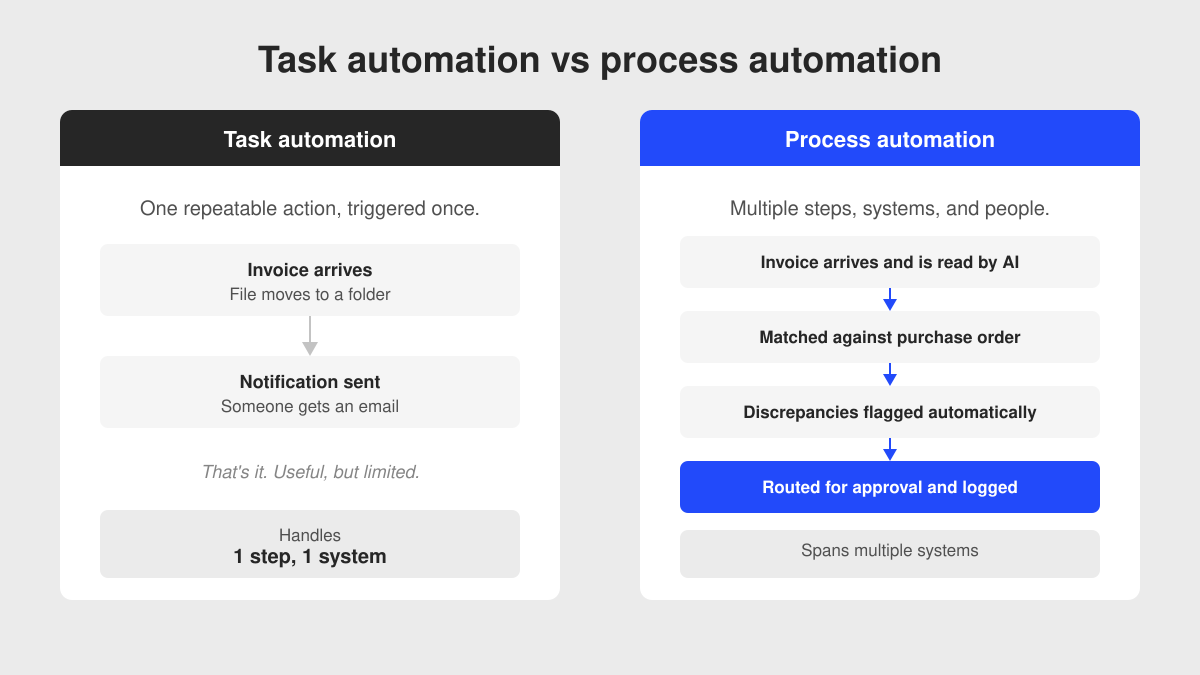
Task automation handles a single, repeatable action. You get an invoice, it goes into a folder, someone gets notified. That’s useful, but it’s not transformation.
Process automation connects multiple steps across systems and people.
An invoice arrives, the system reads it, matches it against a purchase order, flags discrepancies, routes it for approval based on value thresholds, and logs the result.
That’s where the real time savings are.
Most no-code tools do task automation well. True process automation, especially across legacy systems, is much harder.
Why AI changes what’s now possible without code
The sea change I’ve noticed in the last two years isn’t just that automation got cheaper.
It’s that AI can now handle inputs that used to require a human, specifically unstructured ones: documents, emails, voice notes, images.
A workflow that previously needed a developer to write custom parsing logic can now use an AI layer to extract meaning from a PDF and act on it.
Looking for an AI-native development partner? Let’s talk →
For mid-market operations teams, the window to act on that is now wider than it’s ever been.
Operational processes you should automate first
Not everything is worth automating.
In my experience, picking the wrong starting point will waste your time, frustrate your team, and make the whole initiative look like a failure before it’s had a chance to get off the ground.
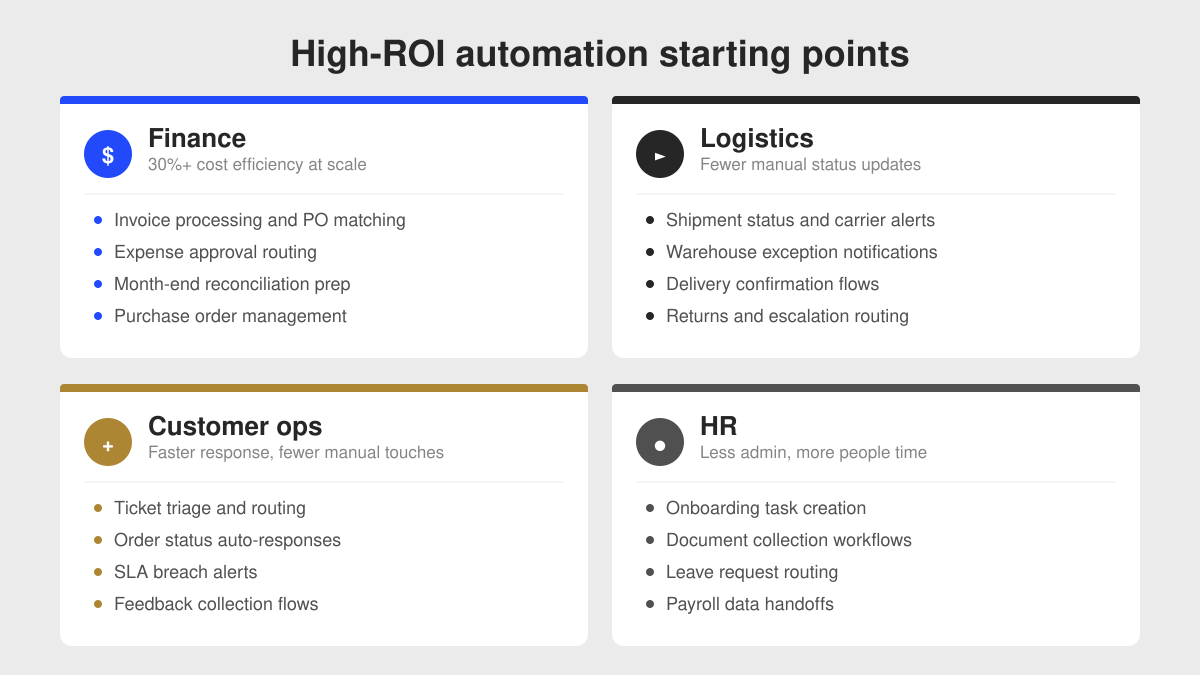
The best place to start is where your team is spending time on work that adds no judgment value:
And that’s before you factor in additional costs from errors, rework, and the delay that comes from anything that needs a human to manually push it along.
The question to ask is: where does a task stall because it’s waiting for a human to move it along?
The common thread is high volume, low complexity, and clear rules.
If a human can describe exactly what they do in five steps, a machine can probably do it.
For teams ready to go beyond task-level wins, AI integration at the process level is where you get compounding returns.
No-code and low-code AI tools for business automation
Workflow automation platforms: Make, Power Automate, Zapier
These are the workhorses of business process automation for non-tech teams.
Zapier connects over 7,000 apps and lets you build automations in plain language. It’s the fastest way to wire together cloud tools that already have APIs.
The free tier covers basic use, with paid plans scaling by task volume. Best for straightforward, app-to-app tasks.
Make gives you more control over branching logic, data transformation, and error handling.
It’s better suited for multi-step workflows where the rules get complicated.
Microsoft Power Automate is already included in most Microsoft 365 plans, which makes it the obvious starting point for Microsoft-heavy organizations.
It connects natively with Teams, SharePoint, Dynamics 365, and the broader Power Platform, and it comes with enterprise-grade governance baked in.
n8n is open-source and self-hostable, which means no per-execution costs if you run it on your own infrastructure.
It requires a bit more technical knowledge to set up, but it’s worth trialing if cost predictability matters and you have even one technically capable person on staff.
AI agents and intelligent document processing
Beyond workflow connectors, a new layer of AI-native tools has emerged.
These can read documents, extract structured data, make decisions based on content, and trigger downstream actions, all without you building the logic yourself.
Intelligent document processing tools like Nanonets and Parseur use AI to extract data from invoices, contracts, purchase orders, and forms automatically.
You train them on examples of your own documents and they handle the rest. No extraction rules, no custom code.
AI agent builders let non-technical users create automated workflows that connect their tools, process documents, and take actions on their behalf.
Claude Cowork takes a different approach: anyone on the team can build reusable AI workflows (Skills) that automate repetitive tasks across their existing workflows.
If you have someone with a bit of technical knowledge, OpenClaw is also worth knowing about.
It’s an open-source, self-hosted AI agent that can automate tasks across almost any software(email, documents, internal tools) without per-execution costs.
The setup is more involved than Copilot Studio or Cowork, but it gives you full control and you avoid vendor lock-in.
How to evaluate these tools when you don’t have an IT function
If you don’t have a dedicated IT team, your evaluation criteria changes.
You’re not asking “does this integrate with our tech stack?” before everything else. You’re asking:
Can a non-technical person build and maintain this workflow?
What happens when it breaks, and how easy is it to diagnose?
Does the vendor support regulated data handling if we’re in healthcare or financial services?
What does this cost if we scale from 10 workflows to 100?
Are we locked in, or can we migrate if we need to?
That last point matters more than you might think.
Workflows built in Zapier or Make are not portable. If you outgrow the platform, you have to rebuild them from scratch.
How to successfully automate your business and avoid risks
The biggest risk in automation projects isn’t picking the wrong tool. It’s moving too fast on processes you can’t afford to get wrong.
Start small, prove value, then expand
The teams that succeed at automation treat the first project as a proof of concept, not a full-fledged transformation.
They pick one high-volume, low-risk process, automate it, measure the result, and use that win to justify the next step.
One survey found professionals believe automation could free up at least 4 hours per week per worker in the near term.
Even capturing that on one team builds real momentum.
A sensible first project has these properties: it runs frequently, the rules are clearly defined, a failure doesn’t cause a customer-facing problem, and you can measure its impact in hours or errors saved.
How to handle legacy systems and data that isn’t clean
This is where I see most automation projects get stuck.
Most established businesses are running some combination of old ERP systems, industry-specific software, spreadsheets, and newer cloud tools.
The systems often don’t share APIs. The data often doesn’t share formats.
That’s a sign of how deeply embedded those systems are, and how carefully any automation layer needs to be designed around them.
No-code tools can handle a lot, but they hit their ceiling when:
Your core system doesn’t expose an API
The data coming out of your legacy platform needs significant transformation before it’s useful
You need fine-grained access control and a full audit trail for compliance
The process involves conditional logic beyond four or five branches
You’re handling sensitive data in a regulated industry
When you hit those limits, you need either a custom integration layer or a more capable platform.
Realistic implementation timeline for business automation
Let’s be honest about the timeline.
A well-scoped, straightforward workflow automation project can go live in two to four weeks.
A process that involves three systems, data transformation, and approval logic takes longer, usually two to three months to build, test, and stabilize.
Companies that deploy intelligent automation typically report 25-40% cost reduction in the processes they automate.
Those numbers are real, but they come after the project is stable, not on day one. The things most likely to cause problems:
Process definition gaps: If your team can’t describe the current process precisely, you can’t automate it.
Data quality issues: If your source data is inconsistent, your automated outputs will be wrong at scale, and errors will happen much faster than a human would make them.
Change management: The tool is rarely the hard part. Getting your team to trust and adopt the new flow is. Budget time for that.
Scope creep: “While we’re at it, can we also add…” is how small automation projects become large, unfinished ones.
McKinsey’s 2025 State of AI report found that nearly two-thirds of organizations are still experimenting or piloting, not running AI at scale.
The gap between “we started an automation project” and “we have a stable, adopted automation running at scale” is where most initiatives stall.
Signs you need a development partner
No-code platforms are genuinely powerful. But there’s a set of situations where the platform alone won’t get you to a working, reliable, scalable result.
You probably need a partner, not just a tool, if:
Your core systems are legacy platforms without open APIs
You’re in a regulated industry where data handling and audit trails aren’t optional
The process you’re automating touches multiple departments and requires governance
You’ve tried a no-code approach and hit its ceiling
You need the automation to work reliably at volume, not just in a demo
None of that means abandoning the no-code tools you’ve already got.
It means having someone who can look at the whole picture and figure out which parts the platform handles cleanly, and which parts need a proper integration or some custom logic to hold together reliably at scale.
Part of what I always stress is knowing what not to automate yet.
Some processes need to be stabilized first. Some data needs cleaning before you get anywhere near a workflow.
Getting that right is what separates a project that delivers real value from one that costs money and goes nowhere.
AI business automation without developers: FAQs
It usually is, and that’s normal.
The practical answer is to pick a process where the data is already reasonably clean, even if other areas aren’t.
One contained automation that works builds more confidence than a cleanup project that takes months before anything runs. You can tackle the messier data as a second phase.
It depends on the tool and your industry.
Most major platforms (Zapier, Make, Power Automate) have solid security certifications, but they’re cloud-based, so your data moves through their infrastructure.
If you’re in healthcare or financial services, or handle EU customer data, check GDPR and sector-specific compliance before you connect anything sensitive. Some tools offer self-hosted or private cloud options for exactly this reason.
Start with time, not technology.
Identify one process, count how many hours it takes per week, and put a cost on it. Then estimate what automation would realistically save.
Even a conservative 30% reduction on a process that costs your team 20 hours a week is a number someone at board level can evaluate. A proof of concept that runs for 4 weeks will give you real data instead of projections.
Looking for a development partner who understands operations, not just code?
If you’ve read this far, you’re probably past the “should we automate?” question. You’re at “how do we do this without it blowing up on us?”
That’s exactly the kind of project we love to take on at DECODE.
We build automation and integration layers for mid-market companies that are running on a mix of legacy systems, modern cloud tools, and manual processes that have never been properly digitized.
We know where no-code platforms are the right answer, and we know where they aren’t.
We’ve built platforms that process 400,000+ daily transactions for major logistics and transportation clients, and we’ve helped our clinets replace manual workflows with AI-assisted systems that their teams actually use.
In every case, the work started with understanding the business problem clearly, not just the technical one.
If you’re trying to figure out where to start, or you’ve already started and hit a wall, we’re the kind of team that gives you a straight answer before we talk about a project scope.
Mario makes every project run smoothly. A firm believer that people are DECODE’s most vital resource, he naturally grew into his former role as People Operations Manager. Now, his encyclopaedic knowledge of every DECODEr’s role, and his expertise in all things tech, enables him to guide DECODE's technical vision as CTO to make sure we're always ahead of the curve.
Part engineer, and seemingly part therapist, Mario is always calm under pressure, which helps to maintain the office’s stress-free vibe. In fact, sitting and thinking is his main hobby. What’s more Zen than that?
Expert interview with Ion Hrytsku of SapientPro on what AI can and can’t do in software development, with practical advice on using it without lowering quality.