But, without proper planning you risk going over budget and overspending on unnecessary features.
The solution is understanding what drives these costs upfront.
This will help you make informed decisions and avoid costly mistakes
In this article, we’ll be taking a look at the 7 top cost factors in enterprise software development and give you some tips on how to handle them.
Let’s dive in!
Key takeaways
Enterprise software typically costs $100,000 to $250,000 for small-scale tools, $250,000 to $500,000 for mid-size solutions, and $500,000+ for large-scale platforms, before ongoing maintenance.
Adding AI or agentic features to an existing project usually adds $20,000 to $150,000. Building an AI-native platform from scratch costs $500,000 to $1.5 million or more.
Maintenance isn’t a footnote. Industry data puts it at roughly 60% of total software lifecycle cost, with a common rule of thumb of 15-20% of the initial development cost every year after launch.
The final price depends on features, team structure, and your long-term requirements.
So, there’s no easy, one-size-fits-all answer to this question.
100+ projects delivered. We’re ready for yours. Let’s talk →
You’ll be talking with our technology experts.
But, here’s a general range you can expect, based on complexity:
Small-scale enterprise software: $100,000-$250,000. An internal tool that replaces a spreadsheet process for one department, or a service layer that connects two systems you already run. Two or three engineers, three to six months.
Mid-size custom solutions: $250,000-$500,000. A full product built from scratch, with web and mobile apps, an admin layer, and integrations into your existing systems. Six to nine people, six to twelve months.
Large-scale enterprise platforms –$500,000+. A business-critical system serving thousands of users daily, or a replacement for legacy software you can’t switch off. Fifteen to twenty-plus people, often running past a year.
None of this happens in a vacuum, either. Gartner projects worldwide IT spending to grow 13.5% in 2026, reaching $6.31 trillion, with software spending alone climbing to $1.44 trillion.
More budget in the market usually means more competition for the same senior talent, which pushes rates up further.
And keep in mind that these ranges are just the development costs.
You also need to plan for long-term expenses like maintenance, updates, and infrastructure.
The key to enterprise software development that doesn’t break the bank is a well-planned budget, and to get there, you need to understand the cost factors behind it.
Key cost factors in enterprise software development
Here, we’ll discuss the main cost factors you need to know in enterprise software development.
Project complexity and features
Complexity is the biggest cost driver in every enterprise software project.
Having more features, integrations, and customizations means higher costs.
But, what exactly makes a project complex?
Here’s what drives up complexity:
Feature depth – More screens, workflows, and interactions require additional design, development, and testing.
Integrations – Connecting with third-party APIs, CRMs, or legacy systems increases complexity and development time.
Multi-platform support – Developing for web, mobile, and desktop at the same time increases complexity and cost.
Real-time processing – Features like live dashboards, messaging, or financial transactions require robust infrastructure and low-latency performance.
Scalability requirements – Systems that have to handle high traffic or large datasets need advanced architecture planning from the start.
Offline functionality – Allowing users to work without an internet connection adds technical challenges for data synchronization.
So, that’s a lot of things you need to juggle.
Cost also varies by the type of system you’re building, not just complexity.
A CRM or HRMS platform typically costs less than a full ERP system, because ERPs touch more business processes, more data models, and more departments at once.
A SaaS platform sits somewhere in between and usually carries its own multi-tenancy and billing requirements on top.
Keep in mind that every feature increases development time, security risks, and ultimately, costs.
And adding too many features too soon can derail your entire project.
Scale adds its own layer of complexity on top of feature count. DECODE’s capacity-planning platform for Norfolk Southern, a Class I US railroad, handles 400,000+ daily reservations in real time. A team of 20 engineers built it in six weeks, and it has saved the railroad over $100 million in operational costs.
Complex, real-time, high-scale systems like this need experienced teams from day one.
Key tips to manage feature complexity
Build an MVP –MVPs aren’t just for startups anymore. Build core features first and expand based on real feedback from users and stakeholders.
Limit integrations – Only connect with legacy systems and third-party services that actually provide real value.
Stick to project milestones – Lock in key features at every stage of development to prevent last-minute scope creep.
AI feature costs
AI features are no longer a small line item you tack onto the end of a budget.
They’re one of the biggest swings in project costs right now, and treating them as an afterthought is how budgets blow up.
Bolt-on AI features, like a support chatbot, predictive analytics, or a single automated workflow, typically add $20,000 to $150,000 on top of a base enterprise project.
Building an AI-native platform from the ground up, where agents and automation are core to the product rather than an add-on, runs $500,000 to $1.5 million or more.
AI and machine learning specialists also command a real premium over standard developer rates in every region, which is worth budgeting for separately rather than assuming your existing team’s rates cover it.
Agentic engineering, using AI coding agents under senior supervision rather than as an unmonitored shortcut, can offset some of these costs.
Done right, it gets features built faster without putting more people on the project.
Key tips for managing AI feature costs
Separate the AI budget – Treat AI features as their own line item with their own ROI case, not something absorbed into the base estimate.
Start smaller than you think you need to – One well-scoped predictive feature usually delivers more value than a full AI rebuild, and costs a fraction of it.
Budget for specialist rates – Factor the AI/ML premium into hiring or outsourcing costs from the start, not as a surprise mid-project.
Development team size and location
The size and location of the development team directly impacts your total costs.
For enterprise-grade projects, where you often need 10+ team members, they add up quickly.
A smaller team might be cheaper, but they’ll take longer. And a larger team will work faster, but they’ll cost more.
The choices you make about your development team can mean the difference between going over budget or delivering within budget.
In-house vs. outsourcing software development: overview
Hiring model
Price
Development time
Expertise
Experience
In-house
Higher due to salaries, benefits, and infrastructure costs
Can take longer because of internal resource constraints
Limited to the expertise of your current team, but offers better domain knowledge
Deep understanding of your culture and processes
Outsourcing
Lower due to reduced overhead and lower labor costs
Usually shorter, because the team can start work immediately and is easier to scale
Experience working on a variety of projects across different industries
Depends on the vendor’s experience with similar projects
Beyond the in-house-versus-outsourcing choice, the specific engagement model changes the cost, too. The four most common models are:
Team extension – Outside engineers slot into your existing team and processes, while you keep management control. Cheapest to start, but requires the most oversight.
Dedicated team – An external team takes ownership of a defined workstream and manages itself day to day. Costs more in coordination upfront, but frees up your leadership’s time.
Build-Operate-Transfer (BOT) – A partner builds and runs the team, then transfers it to you once it’s proven itself. Higher cost across the engagement, but you end up owning a new in-house team. A good fit if you’re expanding in a new market.
Fixed-scope, end-to-end – A fixed price for a defined deliverable. Predictable cost, but expensive to change scope once it’s locked in.
Match the model to how long you’ll need the team and how much control you want to keep. A six-month pilot doesn’t need the same commitment as a multi-year project.
Team location makes a huge difference regardless of model. Average hourly rates vary wildly by region:
Average hourly development rates by role and region
Region
Software engineer
Solution Architect
UX/UI designer
Project manager
Western Europe
$100-160
$130-220
$80-140
$100-160
Central Europe
$30-65
$45-90
$25-55
$35-70
Eastern Europe
$25-55
$40-70
$20-40
$30-55
Asia
$18-60
$30-85
$18-55
$25-70
North America
$80-150
$100-200
$70-120
$75-140
Latin America
$25-60
$40-80
$20-45
$30-65
Africa
$15-45
$25-65
$15-35
$20-55
If you’re based in Western Europe or North America, outsourcing to Central or Eastern Europe can cut labor costs by 3-4x, based on the ranges above.
That’s a real number worth planning around, and a more honest one than any single blanket “percentage saved” figure you’ll see quoted elsewhere.
Fast scaling and experienced teams aren’t mutually exclusive, but only if the vendor already has a good bench to draw from.
Key tips for choosing the right team
Assess your long-term needs – If your project is long-term, investing in an in-house team or a hybrid team (both in-house and outsourcing) makes sense.
Prioritize expertise over cost – Don’t go for the cheapest option. A skilled team will deliver faster, write better code, and save you money on maintenance and fixes.
Test with a pilot project – Before committing to hiring a full team from a vendor, start with a small pilot project to evaluate culture fit and the quality of their work.
Tech stack
Your choice of tech stack directly impacts development cost, speed, and scalability.
The wrong choice will lead to expensive rewrites, security vulnerabilities, and performance bottlenecks down the line.
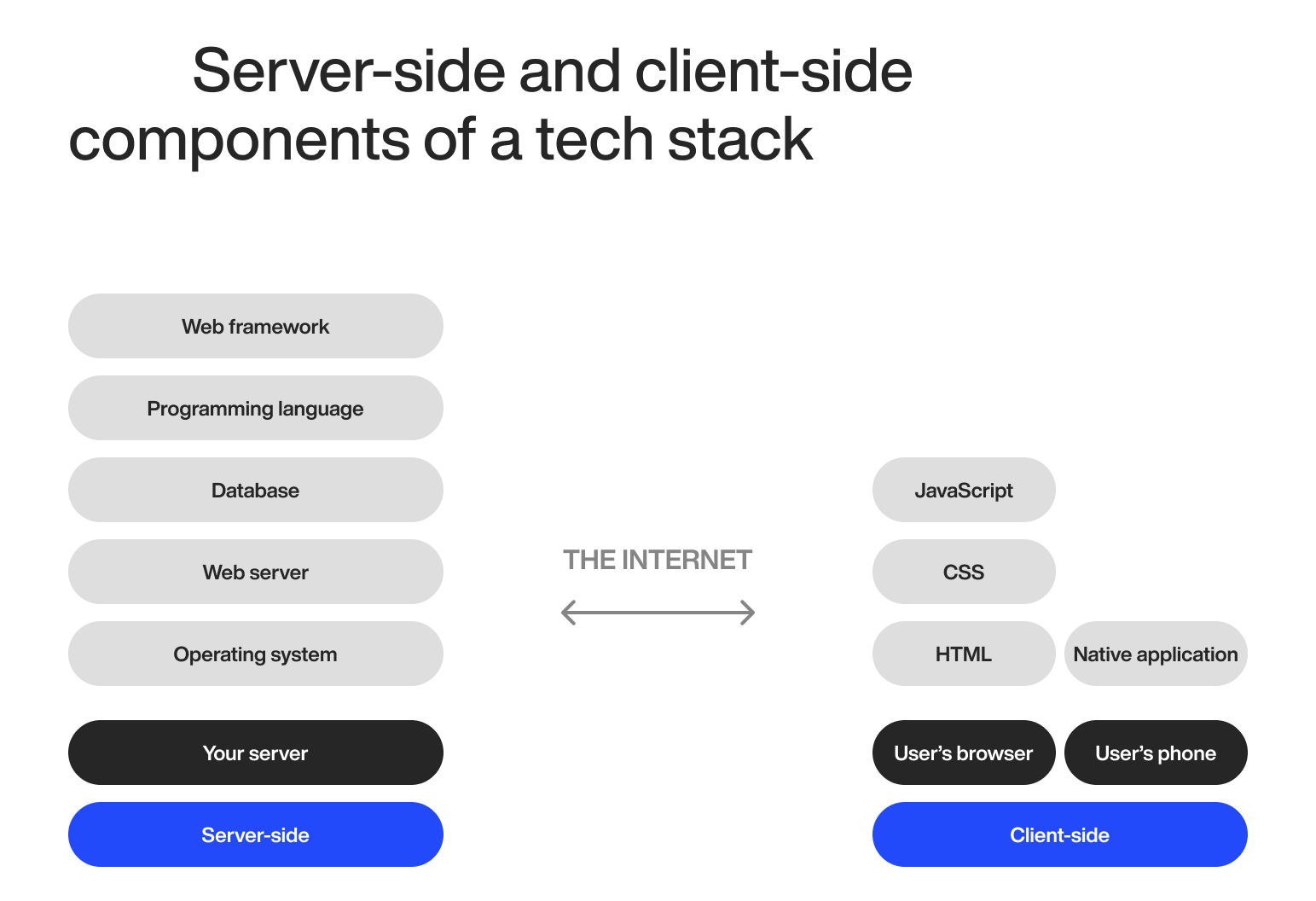
And if you pick the right stack, you’ll develop your product faster – and time is money. Here’s an example of a typical tech stack:
A typical enterprise stack might pair a React or Angular frontend with a Node.js or Java backend, a PostgreSQL database, and a cloud provider like AWS or Azure for hosting.
The exact combination depends on your platform, project scope, and your team’s existing expertise.
The easiest way to cut tech stack costs is choosing a stack your team is most familiar with. You won’t have to pay for training and they can start working without delay.
And that’s essential if you want to cut costs.
Key tips for choosing the right tech stack
Think long-term – Avoid niche or outdated technologies that lack long-term support.
Avoid overengineering – Picking the most complex tech stack often leads to unnecessary delays and higher maintenance costs.
Evaluate developer availability – Some technologies are in high demand but have a limited talent pool, which drives up hiring costs.
Compliance and security requirements
Enterprise software deals with your sensitive business data, so compliance and security are non-negotiable.
You can’t afford to cut corners here.
The cost of getting this wrong keeps climbing.
IBM’s 2026 Cost of a Data Breach report found the global average breach now costs $4.99 million, a new record high. Breaches involving AI systems run even higher, averaging $6 million once AI is part of the attack surface, which matters directly if you’re adding the AI features we covered earlier.
So, investing in strong security is definitely a best practice you need to follow when building enterprise software.
Regulatory exposure adds its own numbers on top of breach costs:
GDPR: fines up to €20 million or 4% of global annual turnover, whichever is higher.
PCI DSS: escalating fines from card networks, from $5,000-$10,000 per month initially up to $50,000-$100,000 per month for continued non-compliance.
SOC 2: the audit itself typically costs $30,000-$150,000, before you count the engineering work needed to pass it.
If your software touches high-risk AI use cases, add the EU AI Act to that list. The compliance deadline for high-risk systems has become a moving target.
It was originally set for August 2026, and EU lawmakers have now provisionally agreed to push it to December 2027 under the bloc’s Digital Omnibus package, pending final adoption.
Planning for the earlier date is still the safer bet. Building compliance in from the start costs far less than retrofitting it later if the final text changes before adoption.
None of this is optional if you’re serious about the product. You’ll need end-to-end encryption, penetration testing, and multi-factor authentication as a baseline, and the regulations that apply to your industry on top of that.
Key tips for managing compliance and security costs
Automate security testing – Automated security scans, penetration testing, and compliance audits will reduce manual effort and lower your long-term costs.
Use pre-certified cloud services – AWS, Azure, and Google Cloud offer compliance-ready solutions (e.g., HIPAA, GDPR, SOC 2) that will drive costs down.
Limit data collection and storage – The more data you collect, the higher the risk and cost. Only store necessary data.
Scalability and infrastructure costs
Enterprise software needs to be able to handle a huge number of users and large data volumes.
And that’s why it needs to be scalable from the start.
But, how does this impact cost? Poor scalability causes:
Cloud overages – Without monitoring, cloud costs can skyrocket due to unused resources.
Expensive rework – A system built without scalability in mind will need a complete overhaul later.
All of this translates into lost revenue and higher costs.
Cloud spend in particular tends to run away from companies that don’t actively manage it.
Flexera’s 2026 State of the Cloud report found organizations waste an estimated 29% of their cloud spend, most of it sitting in idle or oversized resources nobody’s tracking.
Cloud services scale automatically, but they come with ongoing costs: compute, data transfer, and storage all add up. Left unmanaged, your bills can double or triple without much warning.
Scalability isn’t just about handling more users. It’s about doing so efficiently, and the best time to plan for it is before you need it, not after a traffic spike breaks the bank.
Key tips for managing scalability and infrastructure costs
Control autoscaling – Set up your cloud resources to scale only when needed to avoid unnecessary expenses.
Optimize database performance – Poorly indexed queries and inefficient schema design lead to higher storage and compute costs.
Monitor and adjust cloud resources – Idle resources bleed money. Regularly audit your cloud usage to identify and eliminate idle resources.
Third-party services and APIs
Enterprise software never operates in isolation.
All enterprise-grade products and platforms integrate with third-party services, APIs, and external tools to extend their functionality.
Some common third-party services and APIs are:
Payment processing – Stripe, Adyen, Mollie
Messaging and notifications – Twilio, SendGrid, Firebase Cloud Messaging, Resend
Authentication and security – OAuth 2.0, Auth0, Okta, Clerk
CRMs – Salesforce, HubSpot, Pipedrive
Analytics – Google Analytics 4, Mixpanel, Amplitude, PostHog, Datadog, Sentry
AI and machine learning – OpenAI API, Anthropic Claude API, Google Gemini Enterprise Agent Platform (formerly Vertex AI), AWS Bedrock
And that’s barely scratching the surface.
But, each of these comes with its own costs.
APIs usually charge per request, user, or for monthly usage and third-party services offer similar subscription plans.
So, if you integrate a bunch of different services and APIs, you can dramatically increase your costs.
Plus, as your number of users grows, so do the costs.
And that’s why you need to be picky about integrations and make sure they deliver actual value.
Key tips for lowering third-party service and API costs
Monitor API usage – Set limits for API requests so you don’t exceed limits and avoid unexpected costs.
Negotiate enterprise pricing – Many providers offer custom, enterprise-grade plans that lower your per-request costs.
Only integrate essential APIs and services – Every extra API or third-party service adds recurring costs and complexity, so choose wisely.
Employee onboarding and training
Even the most advanced enterprise software is useless if your employees don’t know how to use it.
Don’t think of training and good onboarding as just another expense – it’s an investment in productivity.
Here’s how it impacts costs:
Lost productivity – Your employees will take time to adapt, which might slow your operations.
Training materials – You’ll need to invest resources into creating documentation, a knowledge base, and tutorials.
Support overhead – Without proper training, your IT team will need to spend more time troubleshooting problems.
User resistance – Change management is critical. If you introduce your system poorly, this can lead to frustration and rejection.
A poor onboarding process will lead to low adoption rates and inefficiency.
Untrained employees will make more mistakes, too, which leads to operational risks.
And if your software is too complex and hard to use, some of your employees might even leave.
So, you need to invest in training and onboarding early.
It’s the best way to reduce long-term costs and maximize your ROI.
Key tips for cost-effective employee training and onboarding
Use role-based training – Customize training materials for each user group and focus on what each team needs to know.
Offer self-service resources – Knowledge bases, video tutorials, and FAQs will reduce the need for extensive and time-consuming live training.
Track adoption metrics – Track adoption and adjust training programs based on real data.
Post-launch maintenance and total cost of ownership
Development is only the initial cost. Most of what you’ll spend on enterprise software happens after launch.
Industry data backs this up clearly.
Maintenance and evolution account for roughly60% of lifecycle cost, with only about 40% going to initial development.
A common industry rule of thumb puts annual maintenance at 15-20% of the original development cost, every year the software stays in use.
That means a $300,000 platform realistically costs $45,000-$60,000 a year to keep running, patched, and updated, on top of whatever new features you add later. Budget for that from the start.
Treating maintenance as an afterthought is the single most common way enterprise software budgets go wrong after launch.
Total cost of ownership also includes things easy to forget during initial budgeting: cloud hosting fees that scale with usage, third-party license renewals, security patching, and the eventual cost of migrating off a stack that’s aged out of support.
Key tips for managing total cost of ownership and maintenance costs
Budget maintenance from day one – Set aside 15-20% of the development cost annually before the project even starts.
Plan for a refresh cycle – most enterprise platforms need a meaningful architecture review every 3-5 years. Budget for it in advance.
Track total cost, not just development cost – When comparing vendors or approaches, compare five-year total cost of ownership, not just the initial quote you get.
Enterprise software development cost: FAQs
Your development timeline will depend on your project’s scope, complexity, and team size.
So, the answer is – it depends. But, depending on complexity, here’s what you can expect:
Small-scale enterprise software – 3-6 months
Medium-scale enterprise software – 6-12 months
Large-scale enterprise software – 12+ months
Some common hidden costs you should know about are:
Third-party API fees
Cloud overages
Training costs
Ongoing support and maintenance
Of course, you can combine in-house and outsourced development, depending on your specific needs.
For example, you can outsource non-core and specialized tasks while your in-house team handles mission-critical parts of the project.
In fact, a hybrid model like that is the best of both worlds – you save money on development without sacrificing quality.
But, you need to make sure the company you choose can work well with your in-house team. Ask them if they have experience collaborating closely with clients’ in-house teams and how they handle working with them.
Need a high-caliber development team?
Do you need help building your enterprise software but every company you talk to misses the mark?
Well, you’re in the right place.
We’re an EU-based full-service software development company with 14+ years of experience building complex products for both SMEs and Fortune 500 companies.
So, we know a thing or two about building enterprise-grade products and we’re always on the lookout for a new challenge.
If you want to learn more, feel free to reach out and our team will be happy to set up a quick meet to discuss your needs in more detail.
Mario makes every project run smoothly. A firm believer that people are DECODE’s most vital resource, he naturally grew into his former role as People Operations Manager. Now, his encyclopaedic knowledge of every DECODEr’s role, and his expertise in all things tech, enables him to guide DECODE's technical vision as CTO to make sure we're always ahead of the curve.
Part engineer, and seemingly part therapist, Mario is always calm under pressure, which helps to maintain the office’s stress-free vibe. In fact, sitting and thinking is his main hobby. What’s more Zen than that?