Your operations team exports the same report every Monday, fixes it by hand, and sends it to three people who each keep their own copy. The ERP still runs, but only two people really understand how.
Everything still works. It’s also slower, riskier, and more expensive than it needs to be, and that’s usually when legacy system modernization lands on the agenda.
The costly mistake is treating it as one big replacement project.
As Chief Delivery Officer at DECODE, I’ve seen that mistake more than once. The programs that go well pick the smallest change that removes the real constraint, keep operations running, and measure success in business terms.
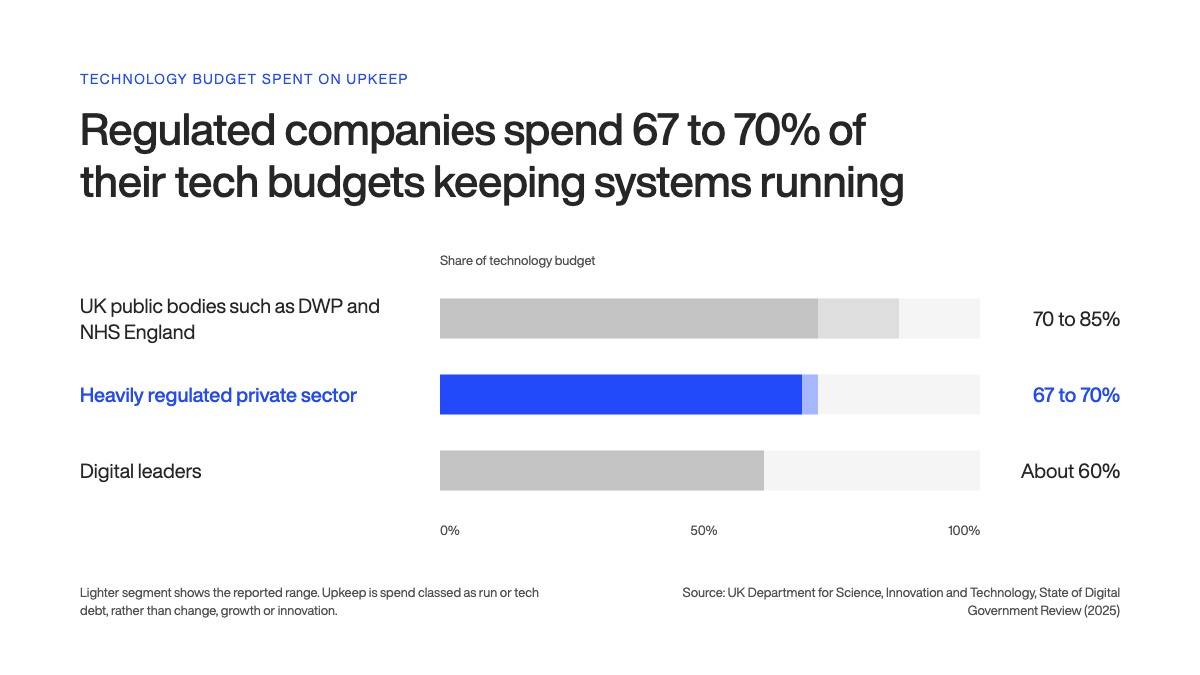
You’re already paying for standing still. The UK government’s 2025 review of digital spending benchmarks found that regulated private-sector companies spend 67 to 70% on upkeep of their technology budgets, against roughly 60% for digital leaders.
Every percentage point of that gap is money you can’t spend on anything new.
This guide covers your options, a decision framework built around operational constraints, how to keep operations running, where AI helps, and what to budget.
Key takeaways:
Legacy system modernization is a set of options, from switching a system off to connecting it to new tools or replacing it. Mid-market companies usually need a mix, chosen system by system.
Choose each approach based on operational constraints: downtime tolerance, vendor support, who understands the code, compliance deadlines, and data quality.
Replace systems in small slices, with old and new running side by side, to modernize without stopping operations. Public audits show how expensive long programs that deliver everything at the end can get.
AI speeds up code comprehension, documentation, testing and translation. Accuracy drops on complex business logic, so senior engineers still have to check every change.
Build business cases that separate cash savings from other benefits, and expect savings to arrive later than forecast.
Legacy system modernization is the work of updating, connecting, moving, or replacing software your business still depends on but that has become expensive to run, risky to keep, or slow to change.
It covers everything from adding an API to a 20-year-old ERP to switching a system off entirely.
Age doesn’t make a system legacy. Cost, risk, and difficulty of change do.
A seven-year-old web app on an unsupported framework can be legacy. A 30-year-old system with good tests and a team that knows it inside out might be fine.
Stop working around your old system. We’ll replace it, one piece at a time. Let’s talk →
In mid-market companies, legacy systems tend to look like this:
An on-premise ERP customized so heavily over 15 years that upgrades are no longer possible.
A warehouse or production system built in-house on Visual Basic, Delphi, or Microsoft Access.
A scheduling or pricing process that lives in spreadsheets and macros one person maintains.
A customer portal running on a PHP or Java version that no longer gets security updates.
Point-to-point integrations where systems swap data through nightly file exports.
Each of these still does its job, while carrying far more of the business than it was designed for.
Signs your legacy system is holding operations back
The clearest warning signs show up in operations before they show up in IT.
If three or more of these sound familiar, the system is costing you more than its maintenance budget suggests:
Teams re-key data between systems or fix exports by hand every week
Only one or two people understand how a critical process works
A small change, like a new field on a form, takes weeks or months
Leadership can’t get a reliable report unless someone assembles it manually
The vendor or platform has ended support, so security patches have stopped
Automation and AI plans stall because nobody can get clean data out
Any one of these is manageable. Together, they mean your operations are built around the system’s limits, and that’s what modernization should fix.
Why modernize legacy systems now?
Legacy systems cost money every year, widen your security risk, and block the automation and AI projects your board is asking about. The longer you wait, the more those costs grow.
For a mid-market company, the bigger cost is usually people’s time.
A peer-reviewed Chalmers University study found that developers waste 23.1% of their time on technical debt, with a median of 17.13%. For a five-person development team, that’s close to one full-time person spent working around old decisions.
Unhealthy code also slows every change.
In a study of 39 production codebases, low-quality code contained 15 times more defects, and issues in it took 124% longer to resolve on average.
You’ll often see this paper quoted as “9x longer.” That’s the maximum time to resolve an issue, the worst case. The average is about 2.2x, which is bad enough.
When I help clients build a business case, I put team time first.
How legacy systems add security and compliance risk
Exploited software vulnerabilities are now the most common way attackers get in.
A 2026 peer-reviewed measurement study found that 60.91% of PHP installations facing the internet run a version that no longer gets updates.
In February 2026, the US Cybersecurity and Infrastructure Security Agency (CISA), the FBI, and the UK National Cyber Security Centre warned jointly that nation-state attackers exploit end-of-support edge devices.
Regulators have somewhat caught up. If you’re a financial company in the EU, the Digital Operational Resilience Act (DORA) requires a yearly risk assessment of all legacy information and communications technology (ICT) systems.
The EU Agency for Cybersecurity (ENISA) also names legacy systems as a barrier to NIS2 compliance across six regulated sectors, including energy, transport, and digital infrastructure. NIS2 is the EU’s updated Network and Information Security Directive.
I treat every unsupported component the way that standard expects: as a logged risk with an owner and a date. If a system can’t be patched, it needs a written plan to isolate, replace, or retire it.
AI tools and agents need two things legacy systems rarely offer: clean data and a way to reach it through an API.
In IBM’s 2025 survey of senior executives,85% said technical debt is a significant barrier to building an advantage with AI.
That’s a vendor survey of companies with $500 million or more in revenue, but it matches what I hear from operations leaders under board pressure to “do AI.”
If that data sits in a 15-year-old database with three conflicting customer tables, the agent project becomes a data cleanup project first. I’d rather clients know that before they budget for it.
What waiting costs
Delay has its own price tag, and government auditors have measured it.
The UK National Audit Office found that five digital change programs ran up £3 billion in extra costs, partly from running legacy systems longer than planned.
The upside of moving is measurable too.
During the pandemic, US states with modernized unemployment systems launched new federal benefit programs 15 days faster on average than states on legacy systems.
Same policy, same deadline, different technology.
It’s public-sector data, but the lesson carries over. A modern system lets you respond when a market or a regulator changes the rules.
What are the main legacy modernization approaches?
There are nine options worth knowing, and you’ll probably use more than one. The standard reference is the 7 Rs from AWS: retire, retain, rehost, relocate, repurchase, replatform, and refactor.
AWS wrote them for cloud migration, so I add two options they leave out: encapsulation and rebuild.
Mixing approaches is normal. In a 2023 vendor survey of 400 mainframe modernization decision-makers, 57% chose replatforming, 53% rehosting, and 43% refactoring.
The totals pass 100% because many companies used several.
I’ve ordered the options from least to most change. Retire sits on its own.
The rest fall into three groups: keep and connect (retain, encapsulate), improve (rehost, relocate, replatform, refactor), or replace (repurchase, rebuild).
Retire
Retire means switching a system off. Every modernization program should start by asking which systems nobody needs anymore.
It’s the cheapest option on the list, and every system you retire is one less to migrate, secure, and pay for.
Before you retire anything, check who still pulls data from it for reports, audits, or compliance. That’s the dependency people forget.
Archive what you’re required to keep, then switch it off.
Retain
Retain means keeping a system as it is, on purpose, with a review date.
It’s the right call when the system is stable, supported, and not blocking anything you plan to do in the next 12 to 18 months.
AWS’s own example fits mid-market companies well: an application that depends on specialized hardware with no cloud equivalent, such as machines in a manufacturing plant.
Write the decision down, with the reason and the date you’ll revisit it. Retain stops being an option the day the vendor ends support.
Encapsulate
Encapsulate means wrapping the old system in an API layer, so new apps, reports, and AI tools can read and write its data without touching its core logic.
It’s often the fastest way to get value from a system that works but can’t talk to anything. It also buys time to plan a bigger change.
The risk is security. An API layer opens the old system to more users and more traffic.
If the platform underneath no longer gets security updates, encapsulating it spreads that risk, so check support status before you open it up.
Rehost
Rehost, often called lift-and-shift, moves the system to new infrastructure, usually the cloud, without changing the code.
It reduces hardware and hosting risk quickly. It doesn’t make the system any easier to change.
I only recommend rehosting on its own when the problem is the data center, the hardware, or an expiring hosting contract.
If users complain about the software itself, rehosting it won’t make a difference.
Relocate
Relocate moves a large group of servers at once from an on-premise platform to a cloud version of the same platform.
A company running its applications on on-premise virtual machines, for example, moves them to a hosted equivalent without rebuilding servers or changing the applications.
It fits when you need to leave a data center quickly and your systems already run on a platform with a cloud equivalent.
It’s the fastest way to move many systems at once. Like rehosting, it moves your old problems along with the servers.
Replatform
Replatform makes a few targeted changes during the move, such as switching to a managed database or a supported runtime.
You get some of the cloud’s operational benefits without rewriting the application.
It fits when the database or runtime is going out of support but the application logic still does its job.
Keep the scope tight. A replatform that grows into a partial rewrite takes on the risk of a refactor without the plan for one.
Refactor
Refactor means restructuring existing code so it’s easier to maintain and extend, without changing what it does for users.
It fits when the system does something specific to your business and someone on the team still understands the code. Work in small, tested steps, one module at a time.
Rearchitect is the deeper version. It changes how the system is put together, for example by splitting one large application into smaller services.
Splitting a system has a cost, so do it only where you need independent scaling or releases.
Repurchase
Repurchase, often called replace, means switching to an off-the-shelf or SaaS product. AWS also calls it “drop and shop.”
For mid-market companies, it’s often the right answer for standard processes like accounting, payroll, human resources, or basic customer relationship management (CRM).
Budget for data migration, retraining, and new integrations around the product. Those decide how hard the cutover is.
If a package would force you to change the process that wins you business, it’s the wrong choice.
Rebuild
Rebuild means writing a new system from scratch, usually on a modern stack, to do the same job better.
It makes sense when the system encodes how you compete, such as a pricing engine, a scheduling model, or a customer platform no package handles well.
It’s the option with the most change and the highest risk if you deliver it in one go.
I’ll only recommend a rebuild when the plan ships it in slices, with the old system still running.
Knowing the options is the easy part. Picking the right one for each system is where modernization programs succeed or stall.
How do you choose the right legacy modernization strategy?
Start from your operational constraints and let them rule options out. The six questions below decide most of it.
We work through them in discovery, system by system, and the right approach for each one usually becomes clear once the answers are on paper.
Six questions to answer before you choose
How much downtime can operations tolerate? If a system runs production, dispatch, or payments around the clock, any approach that needs a long cutover is off the table. You’ll need incremental delivery and a parallel run.
Is the vendor or platform still supported? If security updates have stopped, retain is no longer an option and encapsulation spreads the risk to more systems. Look at replatform, repurchase, or rebuild.
Who still understands the code? If the people who know it are leaving, capture their knowledge first. Refactoring code nobody understands, without tests, is how regressions reach production.
Is the problem the code, the infrastructure, or the integrations? Hardware and hosting problems point to rehost, relocate, or replatform. Slow, risky changes point to refactor. Data you can’t reach points to encapsulation.
Is there a compliance deadline? A fixed date from EU DORA, NIS2, or an auditor limits you to what you can deliver in time. That often means isolating the system now and modernizing it properly later.
How clean is your data? Poor data quality turns any migration into a cleanup project. Find out before you commit to a timeline.
If you can’t answer one of these with confidence, that’s your first task. Do it before anyone picks an approach.
Which approach fits which situation
Each approach has situations where it works and situations where it backfires. The last column matters as much as the first.
Approach
Choose it when
Disruption to operations
It’s the wrong choice when
Retire
Usage is low or another system already does the job
Low
Someone still depends on its data for reporting or compliance and nobody has checked
Retain
The system is stable, supported, and not blocking plans for the next 12 to 18 months
None
The vendor has ended support, or the system blocks a project you’ve already committed to
Encapsulate
The core logic is sound, but people and systems can’t get data in or out
Low
The platform can’t be patched. An API layer exposes that risk to more systems
Rehost or relocate
The problem is hardware, a data center contract, or hosting cost
Low to medium
The pain is in the software itself: slow changes, defects, missing features
Replatform
You need a supported runtime, managed database, or better scaling with limited code change
Medium
The application’s design is the bottleneck
Refactor (including rearchitect)
The system is specific to your business and someone still understands the code
Medium, if done in slices
Nobody understands the code and there are no tests. Document and test first
Repurchase
The process is standard, like accounting or payroll, and doesn’t set you apart
Medium to high at cutover
Your process is how you win business, and a package would force you to change it
Rebuild
The system is central to how you compete and the old design can’t support where the business is going
High, unless delivered in slices
A standard product already does the job well
The answer for a mid-market company is rarely one row.
A realistic plan might encapsulate the ERP, replace a commodity tool with SaaS, retire two systems nobody uses, and rebuild the one system that gives the company its edge.
How do you modernize a legacy system without stopping operations?
The short answer: replace the system in slices, and keep the old one running until each new slice has proven itself in production.
That principle sits behind every low-disruption modernization I’ve seen work, and the techniques that make it possible are well documented.
Why big-bang replacements carry more risk
A big-bang replacement switches everything over on one date. It looks simpler on paper.
In practice, it concentrates all the risk into a single cutover and delays any value until the very end.
The public record shows what happens when value waits for one big release.
The US Social Security Administration paused a major IT investment after six years without putting any software into production.
Its inspector general warned that $69 million would be “largely wasted” if the work stayed unfinished.
At the IRS, one modernization milestone slipped nine years while spending reached $1.47 billion, nearly four times the original estimate.
The problem isn’t limited to government.
Across 5,392 public and private IT projects completed between 2002 and 2014, researchers led by Bent Flyvbjerg found a mean cost overrun of 80%, with a fat tail of projects that overran by far more.
Strangler fig pattern: how it works
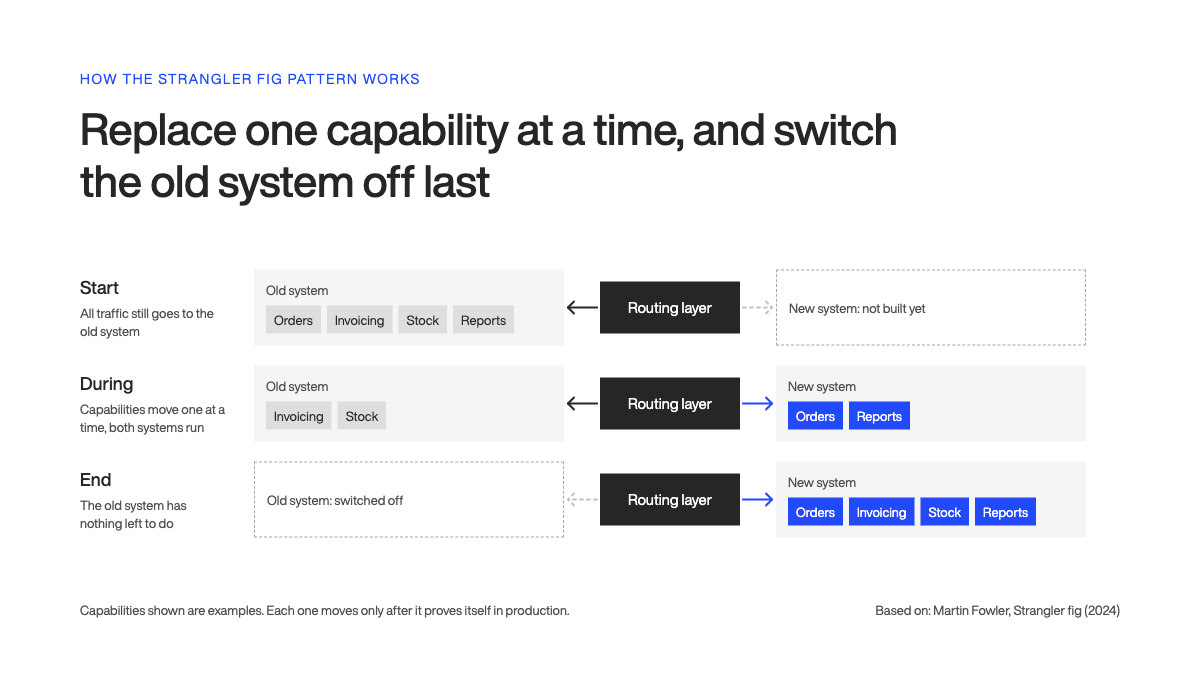
The strangler fig pattern replaces a system piece by piece.
You put a routing layer in front of the old system, build one capability in the new system, send that traffic to it, and repeat until the old system has nothing left to do.
For an operations leader, the benefit is simple. Each release is small, you can roll it back, and users get value months earlier.
It’s also a common choice. In a University of Stuttgart study of 14 systems moving to microservices, half used the strangler pattern.
Those migrations ran from 1.5 to more than 3 years, so plan for a program with value delivered along the way.
For any replacement of a system that runs day-to-day operations, I don’t treat strangler fig as optional. The extra routing work pays for itself the first time you need to roll something back.
How to run old and new systems side by side
A parallel run means both systems process the same work for a period.
Your team compares the results and investigates every difference before anyone switches off the old path.
For large systems, one published guide puts parallel running at 3 to 6 months. A parallel run works best when you:
Start with a low-risk group: one site, one product line, or one customer segment.
Compare outputs automatically: reconcile totals, records, and key reports every day.
Use feature flags: switches in the code that move users between old and new without a new release.
Agree rollback rules in advance: decide what failure looks like and who makes the call.
Get sign-off from the people who use it: operations, finance, or customer service, as well as IT.
Our work with Norfolk Southern, a Class I US railroad, kept old and new systems working together from the start.
Capacity allocation for intermodal trains was a manual, fragmented process. Our team of 15+ people built a reservation platform that automates it and connects to the railroad’s existing real-time tracking and scheduling software through custom APIs.
Operations kept the systems they relied on, and the new platform took over the manual work.
It has processed thousands of reservations a day, with significant projected savings. You can read the details in our case study.
When is legacy system integration enough?
Integration is enough when the old system’s core logic is sound and the real problem is that nothing else can reach it.
An API layer lets new apps, dashboards, and automations use its data while the core keeps running.
We used this pattern for Kaptio, a travel technology company whose platform runs on Salesforce. Complex travel bookings with real-time pricing pushed Salesforce past its performance limits.
We built a backend layer that runs the whole booking process and live pricing, then sends only finalized bookings to Salesforce.
Users got faster bookings, and Salesforce kept cleaner data.
The same approach works on a 20-year-old ERP or a warehouse system. Integration stops being enough when:
The platform underneath is unsupported or can’t be patched.
The integration layer starts duplicating business logic the old system should own.
Every new requirement still needs a change to the old core.
At that point, the API layer becomes the starting point for a strangler fig migration.
How do you migrate data from a legacy system safely?
Move data in waves, prove each wave with reconciliation, and keep the old system readable until the business signs off.
Data is where I’d add the most contingency to any modernization plan.
The evidence supports this.
An Oxford study of 1,355 public-sector IT projects found that 41% of data management projects became black swans, with cost overruns above 25%.
The data is from 2012 and from government, but nothing I’ve seen since suggests data got easier.
A safe migration follows six steps:
Profile the data early. Count records, find duplicates, and check formats before you estimate anything.
Decide what to move. Archive old records you need for compliance and migrate only what the new system uses.
Map and transform. Document how each old field maps to the new model, including the business rules hidden inside it.
Migrate in waves. Move one entity, site, or year at a time, and run the same reconciliation checks after each wave.
Keep the old system read-only. Leave it accessible for a set period, so teams can check history without guessing.
Get business sign-off. The people who own the data confirm it’s correct before cutover.
Each step has its own pitfalls, from hidden business rules to cutover weekends, you need to be aware of.
How can AI help with legacy application modernization?
AI now handles a real share of legacy modernization, from reading and documenting old code to translating it into a modern stack.
Studies published in 2026 show where it holds up: straightforward code translates well, and accuracy drops as business logic gets more complex.
Where AI helps today
AI is strongest on the slow, repetitive parts of modernization:
Code comprehension: AI reads a large codebase and explains what a module does, which data it touches, and what calls it. That shortens the weeks engineers spend learning an unfamiliar system.
Documentation: AI drafts documentation for code nobody documented. An engineer still verifies it.
Test generation: AI writes characterization tests, which record what the system does today, so you can tell when a change breaks something.
Repetitive changes: AI handles large volumes of similar edits, like updating an API call across hundreds of files.
Code translation: AI drafts translated code module by module, for engineers to test and review.
Google offers some of the best public evidence.
In a 2025 experience report on internal code migrations, Google engineers found that 80% of code modifications in the changes that shipped were fully AI-authored, and they estimated total migration time fell by about 50%.
Humans reviewed the AI-generated code like any other code. It’s one company with very mature tooling, reporting its own experience.
A peer-reviewed 2026 case study shows the effect on a full project.
It’s a single project, and the author stresses that human validation was essential throughout.
Where AI still needs close supervision
Complex business logic is the weak spot.
In a 2026 study, researchers used Claude Code to migrate 12 features of a Visual Basic 6 ERP system to C#.
Simple features came out 92% equivalent to the original, complex ones 47%, for a 70% average. Caveat: It’s a preprint covering one system.
Larger codebases need more than a model.
IBM researchers presented a COBOL-to-Java approach at ICSE 2026 that pairs language models with program analysis, and reported functional quality above 75% on real customer applications.
My rule is simple: AI output is a draft until tests and a senior engineer say otherwise.
How we use AI on modernization projects
We use senior-supervised agentic engineering: AI agents do much of the hands-on work, and senior engineers own every decision.
Claude Code is our main agentic tool. We’re also a services partner in Anthropic’s Claude Partner Network, which launched in March 2026 with a Code Modernization starter kit for migrating legacy codebases.
On a modernization project, that looks like this:
AI maps the codebase and drafts documentation, which engineers verify against the running system
AI writes characterization tests that pin current behavior before anyone changes a line
AI drafts changes in small pull requests, and senior engineers review each one for architecture, error handling, and edge cases
For regulated industries, we can run models on Spark, our private AI infrastructure, so your data never touches a public API
The short version: AI makes our engineers faster on the slow parts of modernization, and they stay accountable for everything that ships.
What does a legacy modernization roadmap look like?
A workable roadmap has four main phases: assess, plan, deliver in increments, and decommission.
Assessment and planning together usually take one to two months, because the two often overlap.
Delivery ranges from a few months for a rehost to two years or more for a phased rearchitecture of a complex system.
Treat these ranges as starting points. Your assessment should replace them with numbers for your systems.
Start with an assessment
An assessment tells you what you have before you decide what to change.
For a focused audit of one core system and its integrations, I’d plan for 2 to 4 weeks, on average.
Without an assessment, even large organizations don’t know what they’re running.
A good assessment gives you:
An inventory of systems, integrations, and data flows, each with an owner.
A risk view covering unsupported components, security gaps, and knowledge held by one person.
A recommended approach for each system, based on the six questions from earlier.
A first estimate of cost, timeline, and team.
If a partner wants to start writing code before this exists, I’d ask why.
Build the business case and roadmap
Next, turn the assessment’s findings into a plan: which systems change first, which wait, and what each step costs.
For one core system, plan 2 to 4 weeks, often overlapping with the end of the assessment. For larger migrations, plan for 2 to 4 months.
Sequence by risk and value. Put urgent security and compliance work first, then the slice that removes the most manual work for operations.
Deliver in increments
Delivery time depends on the approach. These are the typical ranges I’d plan around:
Rehost or replatform: 2 to 6 months for a focused infrastructure migration.
Phased refactor of specific modules: a few weeks per module, released one at a time.
Rebuild of a complex system: typically 6 to 12 months on our projects.
Phased rearchitecture of a complex monolith: 12 to 24 months, longer than a rebuild because it usually covers a larger estate with many connected systems that keep running throughout.
For every slice, run old and new side by side until the results match and the people who use it sign off.
Only then do you switch off the old part, so operations keep running throughout.
Decommission the old system
Once the new system works, it’s tempting to leave the old one running just in case.
But you keep paying its licenses, hosting and support until it’s switched off.
The US Treasury’s inspector general reported that of 34 IRS legacy case management systems slated for decommissioning, none had been decommissioned.
Put decommissioning in the roadmap as its own phase, with a budget, a date, and an owner.
Archive the data you need for compliance, cancel the licenses and hosting, and remove the old integrations.
Measure progress
Measure operational outcomes first. Track these from the assessment onward, so you have a baseline:
Hours of manual work per week in the affected process.
Time to complete a core process, such as order to invoice or request to dispatch.
Time to produce a management report.
Incidents and outages tied to the system.
Annual cost to run, including licenses, hosting, and support.
For delivery health, use the software delivery metrics from DORA, a Google Cloud research program unrelated to the EU regulation of the same name.
Its current metrics guide lists five: change lead time, deployment frequency, failed deployment recovery time, change fail rate, and deployment rework rate.
If modernization is part of a wider change program, the roadmap needs to fit into it.
How much does legacy system modernization cost?
For a mid-market company, end-to-end legacy system modernization usually starts in the low hundreds of thousands, with assessments in the tens of thousands.
Where you land depends on scope and approach. The main cost drivers are:
Size and age of the codebase, and how much of it anyone still understands.
Number of integrations with other internal and external systems.
Data volume and quality, which decide how hard migration will be.
The approach, since a rehost costs far less than a rebuild.
Compliance requirements, such as audit trails and security testing.
The approach makes the biggest difference. For a mid-size system with 5 to 20 integrations, typical ranges look like this:
Approach
Typical range
What drives it
Rehost
$50,000 to $200,000
Infrastructure and testing, with no code changes
Replatform
$100,000 to $500,000
Targeted changes on top of the move
Refactor
$150,000 to $600,000
How many modules change and how well they’re tested
Rearchitect
$300,000 to $1,500,000
Splitting the system and testing every new boundary
Rebuild
$500,000 to $3,000,000+
Design, build, data migration, and parallel running
Repurchase
$100,000 to $2,000,000+
Licenses, data migration, retraining, and new integrations
Undocumented code, heavy integration, and regulated data can add 30 to 50% to these figures.
Our own ranges are in line with those. Our product discovery phase or a focused audit costs €20k to €50k, and our end-to-end modernization projects typically run €250k and up.
The spread is wide because a full rebuild costs far more than refactoring a handful of modules.
My advice: don’t accept a single number for a whole program before the assessment. Ask for a firm price on the assessment and the first increment, and a range for the rest.
Should you modernize in-house or with a partner?
For most-mid market companies, the best approach is a hybrid team.
Your people own the business knowledge and the decisions, and an external partner brings delivery capacity and modernization experience.
Keeping it in-house works when:
Your team knows the system and has time beyond keeping it running
You already have the target skills, such as cloud, the new stack, and test automation
There’s no hard deadline
A partner makes sense when:
Your IT team is fully booked keeping current systems alive
You need skills you don’t have for a project you’ll do once
A compliance date or business event sets the deadline
Skills are a real constraint. In EvolveWare’s survey, 81% of IT decision-makers said hiring legacy programming talent was difficult.
The hybrid model suits modernization because your people know how the business uses the old system.
A partner can learn the code quickly. Learning why the warehouse team ignores field 14, for example, takes much longer.
Whatever the setup, name one internal owner with authority to make decisions and direct access to leadership.
Plan for life after launch too, with a software maintenance plan agreed before the first release. That’s when a partner’s long-term commitment matters most.
Ready to modernize without disrupting your operations?
You know which systems are slowing operations down. What you need now is a clear view of the options for each one, and a plan your teams can live with while the work happens.
We assess your systems, integrations, and data, recommend an approach for each, and deliver in increments while your operations keep running.
Each of our senior teams works on one project at a time, and they use AI agents under close supervision to move faster on the slow parts of modernization.
A US wealth management firm came to us running its advisory work across 12 separate tools. We started with a structured discovery phase, then built one custom platform that replaced all 12.
Advisors now see every client, entity, and portfolio in one place, with compliance audit trails built in.
Start with an assessment, and you’ll know your options, risks, and costs before you commit to anything bigger. Feel free to get in touch and book a modernization assessment!
Ante is a true expert. Another graduate from the Faculty of Electrical Engineering and Computing, he’s been a DECODEr from the very beginning. Ante is an experienced software engineer with an admirably wide knowledge of tech. But his superpower lies in iOS development, having gained valuable experience on projects in the fintech and telco industries.
Ante is a man of many hobbies, but his top three are fishing, hunting, and again, fishing. He is also the state champ in curling, and represents Croatia on the national team. Impressive, right?