AI MVP development means using AI tools and coding agents at every stage of building a minimum viable product (MVP): research, scoping, prototyping, code, and testing.
With discipline, it gets a testable product to users much faster. Without discipline, you get a demo that breaks the first time real users touch it.
I run delivery at DECODE, where every engineer has a seat on Claude Code.
If you’re a product team or a company testing a new product, this is the process I’d follow. For MVP fundamentals, start with our MVP development guide.
Key takeaways
AI speeds up research, scoping, prototyping, coding, and testing. Every stage still needs a person who owns the decisions.
The safest way to build an MVP with AI is plan-first. An agent drafts the plan, and a senior engineer reviews it before any code gets written.
AI-co-authored code carries more defects and security issues than human code. Thorough review and testing are mandatory, even for an MVP.
A vibe-coded MVP is fine for a throwaway demand test. It’s risky as the foundation of a real product.
“AI MVP” means two different things, and you need to know which one you’re paying for.
The first is using AI to build an MVP. AI tools help your team research, design, code, and test the first version of any software product. That’s what this article covers.
The second is building an MVP of an AI-powered product, like a support chatbot, a recommendation engine, or a document-processing tool. There, AI is the feature itself.
Test the market before you overbuild. Let’s scope your MVP. Let’s talk →
You’ll be talking with our technology experts.
That has its own questions: which model to use, how to handle training data, and how to measure output quality. If that’s your plan, our AI software development page covers it in depth.
The two often overlap, since plenty of teams use AI to build an AI product. I’d still keep them separate in your planning, because the risks and the budgets are different.
What can AI speed up in MVP development, and what can’t it?
AI speeds up every phase of MVP work, but it doesn’t make the judgment calls in any of them. The gains are also smaller than the hype suggests.
Bain found that typical productivity gains in 2024 were 10 to 15%, with leaders reaching as high as 30%.
Still, 63% of companies report higher output per engineer, and 53% report faster release cycles.
The way I read it, the 30% belongs to teams that rebuilt their workflow around AI. Giving developers an assistant and changing nothing else gets you the smaller number.
Here’s where AI helps in each phase, and where a person still has to step in.
Phase
Without AI
With AI
What still needs a human
Market research
Weeks of desk research and manual survey coding
Hours to summarize competitors, reviews, and interview transcripts
Talking to real customers and deciding what the findings mean
Scoping and backlog
Days of writing epics and tickets by hand
A draft backlog from a requirements doc in a day
Cutting scope and setting priorities
Prototyping
Days or weeks of wireframes and mockups
A clickable user interface (UI) in hours
Judging usability, accessibility, and brand fit
Coding
Engineers write every line
Agents draft features from a reviewed plan
Architecture, security, and code review
Testing
Hand-written test scripts
Agents generate tests and automation scripts
Exploratory testing and edge cases
Launch and iteration
Manual feedback triage
AI clusters feedback and drafts release notes
Deciding what to build next
Our MVP development guide covers the wider research on developer trust and AI productivity, so I won’t repeat it here. The short version: AI pays off when experienced people check its output.
How do you build an MVP with AI step by step?
These six steps follow the order we use on real projects. You can compress them, but I wouldn’t skip any.
Step 1: Research the market and pressure-test the idea with AI
Use AI to compress desk research, then spend the time you save talking to real people.
Feed a model like Claude or ChatGPT your competitors’ websites, app store reviews, G2 reviews, and relevant forum threads. Then ask focused questions:
What do users complain about most across these competitors?
Which features show up in every product, and which show up in none?
How do competitors price, and which tier do reviewers say is worth it?
Here are my interview transcripts. What themes repeat, and which quotes back each one?
Argue against my idea. What’s the strongest reason it fails?
Researchers have moved fast here. Qualtrics found that 89% of researchers use AI tools regularly or are experimenting with them. Also, 71% expect synthetic responses to make up more than half of data collection within three years.
I’m cautious about synthetic personas. They show what a model thinks is plausible. They can’t tell you whether your buyers will pay.
I’d use them to sharpen interview questions and never to replace interviews. Our guide on how to validate an MVP covers the human side of this step.
Step 2: Turn discovery notes into a scoped spec and backlog
Hand your discovery notes to AI and have it draft the spec, user stories, and acceptance criteria. Then review every line. This is one of the biggest time savers we’ve found.
The catch is that cheaper code tempts you to overbuild. When a feature takes an agent an afternoon, it’s easy to say yes to everything.
I push back hard here. Every extra feature is one more thing to test, maintain, and explain to users.
A practical routine:
Ask the AI to tag every story as must-have, should-have, or could-have.
Cut everything that isn’t a must-have, then cut again.
Have the AI write acceptance criteria for what’s left, so testing has a clear target.
If you need a framework for those cuts, our article on feature prioritization methods walks through the main options. A smaller scope also makes every later step faster.
Step 3: Prototype in days with AI design and UI tools
Generate a clickable prototype from your spec and put it in front of five real users within the first week. Tools like Claude Design, Lovable, v0, Bolt, and Figma Make turn a written description into a working interface in hours.
Treat that output as a sketch. Figma’s 2025 AI report found that 78% of respondents say AI makes their work significantly more efficient. Only 32% say they can rely on its output.
Your designer still owns the user flow, accessibility, and consistency with your design system.
At DECODE, our designers now do much of this work in Claude Design, which builds screens directly from our design system. We still use Figma where a project calls for it.
The bigger gain comes from connecting design to code.
On Figma projects, our teams use the Figma MCP. With it, developers can easily pull a link from our Figma file into their coding agent.
Step 4: Build with AI agents under senior engineer review
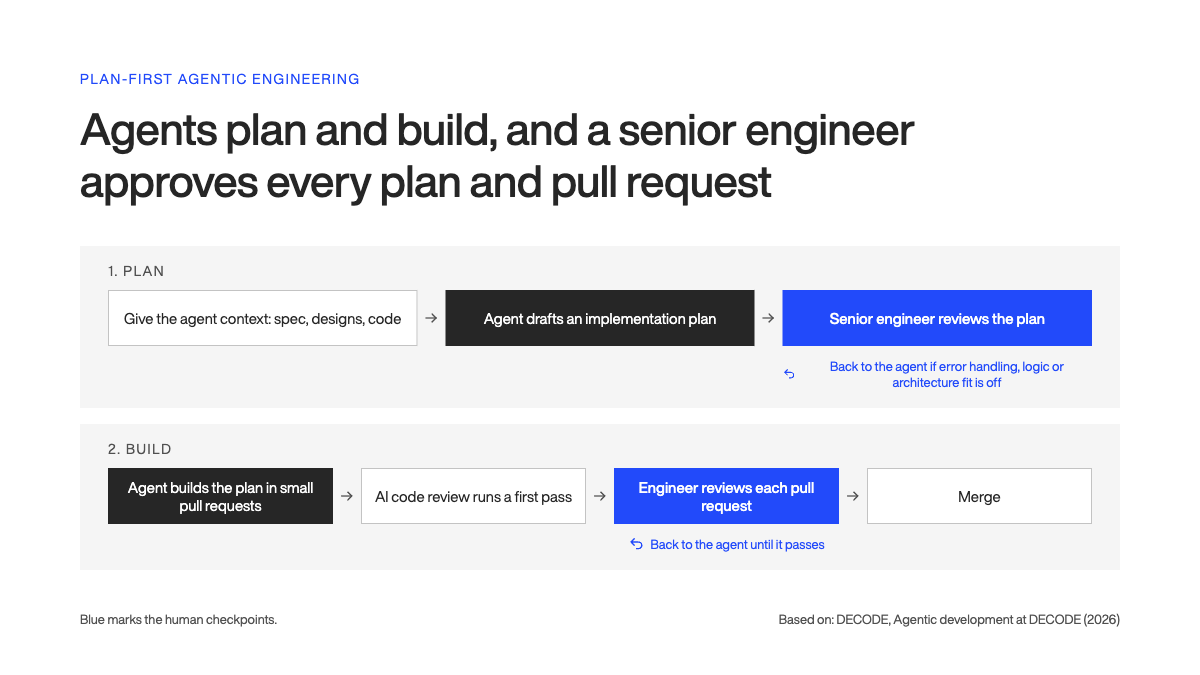
Make the agent plan before it codes, and have a senior engineer review that plan. This is the step where AI MVPs succeed or fail. The plan-first workflow we use looks like this:
1. Give the agent context: the spec, design links, relevant code, and your conventions.
2. Ask it to draft an implementation plan for one feature before writing any code.
3. A senior engineer reviews the plan for weak error handling, flawed logic assumptions, and fit with the architecture.
4. The agent implements the approved plan in small pull requests.
5. AI code review tools run a first pass on each pull request, and the engineer reviews it with the same rigor as any other code.
The review step is non-negotiable for me, and the data backs that up. CodeRabbit analyzed 470 pull requests and found AI-co-authored ones had 1.7x more issues, 10.83 per pull request against 6.45.
They also had 75% more logic and correctness issues and up to 2.74x more security issues.
Reviewers at DECODE also look for shallow tests and code that looks correct but may fail in production. Our engineers stay responsible for the plan, the logic, and the final result.
When review is built in, the speed doesn’t cost you quality.
Need a senior team to build your MVP? Our engineers combine agentic engineering with product thinking, so you reach users faster with a codebase you can keep building on. Explore our MVP development services
Step 5: Generate tests and check what AI misses
Have agents write your tests, then check those tests as carefully as the code. AI writes tests fast, but it repeats the blind spots of the code it just wrote.
Security is the biggest blind spot.
Veracode tested more than 100 large language models and found AI introduced security vulnerabilities in 45% of 80 coding tasks. The models failed to defend against cross-site scripting (XSS) 86% of the time.
The speed gain on test automation is real. Marko Brajer, our QA Team Lead, says: “With built-in tools like Codegen, writing automation scripts that used to take 2 hours now takes less than half an hour.”
Codegen is Playwright’s tool for recording test scripts. Testsigma is another option if your team prefers low-code test automation. Our roundup of AI test automation tools compares 12 of them.
My testing checklist for an AI-built MVP:
Generate unit tests from the acceptance criteria you wrote in step 2, not from the code itself.
Check that tests fail when they should. A test that only mirrors the code proves nothing.
Keep exploratory testing human. A tester poking at odd paths still catches what scripts miss.
Exploratory testing with AI is still experimental, manual testing still has a role there. Users will do things nobody wrote a test for, and you want a person to find them first.
Step 6: Launch, measure, and iterate
After launch, use AI to process feedback faster, then let your product owner decide what comes next.
Three jobs fit AI well:
Clustering support tickets, reviews, and survey answers into themes
Drafting release notes from merged pull requests
Triaging error logs to spot recurring crashes
Bug reports get faster too.
We built a custom Chrome extension for our QA team. You write two or three sentences describing the bug, and it fills out the rest of the template for you. This saves us 5 to 20 minutes per bug, on average.
Faster feedback loops are the whole point of an MVP, so this step deserves the same care as development.
Which AI tools are best for building an MVP?
The best AI tool for building an MVP depends on the job, so pick one per job and learn it well. Here’s the shortlist I’d start with in 2026.
Job
Tools
What they do
Research and specs
Claude, ChatGPT
Summarize research, draft specs, user stories, and acceptance criteria
Prototyping and UI
Claude Design, Lovable, v0, Bolt, Figma Make
Turn written descriptions into clickable, working interfaces
Coding agents
Claude Code, Cursor, OpenAI Codex, GitHub Copilot
Plan and implement features across a codebase
Testing
Playwright with AI-generated tests, Testsigma
Generate and run automated tests
These tools have moved well past autocomplete. GitHub Copilot now includes agent mode on all plans. On Pro plans and above, its coding agent can take an issue and open a pull request on its own.
At DECODE, Claude Code is our standard agentic tool. I’d rather a team know one agent deeply than switch between five.
A vibe-coded MVP is good enough for a throwaway demand test and risky as the foundation of a real product.
Vibe coding means describing what you want in plain language and accepting whatever the AI produces, often without reading the code.
It’s spreading fast. TechCrunch reported that 25% of Y Combinator’s Winter 2025 batch had codebases that were about 95% AI-generated.
YC also noted that these founders are highly technical. They can read, debug, and rewrite what the AI produces, which changes the risk completely.
My rule is simple. Vibe coding is fine if:
You’ll throw away or heavily rework the code after the test
No real user data or payments touch the product
The only question is whether people want this at all
If paying customers will store data in it, bring in engineers before launch.
Our MVP development guide explains when to build a throwaway MVP and when to build a foundation you can scale.
How much faster and cheaper is an MVP built with AI?
An MVP built with AI under senior engineer supervision can ship in roughly half the time. That’s the result of a mature agentic engineering process, where senior engineers review every plan and every pull request.
Costs ultimately depend on complexity.
Our MVP cost breakdown covers the full ranges, from $5K to $15K for a no-code test up to $150K to $250K+ for complex or AI-native products.
My advice is to put the time you save back into user testing. A faster MVP only pays off if you learn something from it.
Want to build your MVP with engineers who use AI?
If you’ve been weighing AI tools against the risk of a codebase nobody can maintain, you’re asking the right question. Speed only helps if what you build holds up once real users start using the product.
Our senior teams combine agentic engineering with product thinking.
AI agents draft the plans and the code, and senior engineers review every plan and pull request. That’s how we cut timelines in half without cutting corners.
Each team works on one project at a time, so the people building your MVP are focused only on your product.
We’ve been building software since 2012 for companies like Microsoft, AT&T, and Royal Caribbean.
See how we work on our MVP development services page, or get in touch to talk through your MVP with our team.
Ante is a true expert. Another graduate from the Faculty of Electrical Engineering and Computing, he’s been a DECODEr from the very beginning. Ante is an experienced software engineer with an admirably wide knowledge of tech. But his superpower lies in iOS development, having gained valuable experience on projects in the fintech and telco industries.
Ante is a man of many hobbies, but his top three are fishing, hunting, and again, fishing. He is also the state champ in curling, and represents Croatia on the national team. Impressive, right?