We’ve scoped hundreds of custom software projects at DECODE, and every first call starts with the same question: what will this cost?
Custom software costs anywhere from $40,000 to over $1 million.
A single-platform internal tool with a handful of screens sits at the low end. A multi-platform enterprise system with custom integrations, compliance requirements, and a team of 20 behind it sits at the high end.
Of course, that’s too wide a range to plan with, so you need to know what puts your project at one end or the other.
This article covers the 11 major cost factors that decide the price of custom software, with current rates and ranges. You’ll see what to budget, and where you can spend less without sacrificing quality.
Unfortunately, there’s no easy answer – the best answer is “it depends”. But, we can give you an estimate based on the most important factor (spoilers!) – complexity:
Custom software development cost
Complexity
Cost range
Features
Simple custom software
$40,000 – $120,000
Minimal features, single platform, basic functionality
Advanced custom software
$120,000 – $300,000
Moderate feature set, several integrations, multiple user roles
The exact number always comes down to what you’re building.
Like we mentioned earlier, a simple internal tool with a handful of features costs a fraction of what enterprise software with dozens of integrations costs.
If you want to see this play out in practice, we’ve published in-depth cost breakdowns of building products like Threads and Revolut on our blog.
In our experience, feature complexity impacts the cost of any software more than any other single factor, more than team location, more than platform choice.
That’s why we spend the first stretch of every project scoping features before we scope cost.
With the overview out of the way, here are the 11 factors that determine what you’ll pay.
11 custom software development cost factors
Some are about who builds it, some are about what you’re asking them to build, and a few are about how you structure the deal itself.
The custom software development team
People are the biggest cost in software development. Who you hire, and where they work, sets most of your budget before you write a line of code.
Rates vary by region and by role. Here’s what you can expect to pay for the roles on a typical project:
Average hourly development ratesby region
Region
Software engineer
Solution Architect
UX/UI designer
Project manager
Western Europe
$100-160
$130-220
$80-140
$100-160
Central Europe
$30-65
$45-90
$25-55
$35-70
Eastern Europe
$25-55
$40-70
$20-40
$30-55
Asia
$18-60
$30-85
$18-55
$25-70
North America
$80-150
$100-200
$70-120
$75-140
Latin America
$25-60
$40-80
$20-45
$30-65
Africa
$15-45
$25-65
$15-35
$20-55
A software engineer in North America bills $80-150/hr on average, compared to $30-65/hr in Central Europe and $25-55/hr in Eastern Europe. That gap comes from cost of living, currency strength, and local demand for talent, not from a difference in quality.
We wouldn’t tell you to pick a location purely because it’s the cheapest. The engineers working on a $250k+ project need to be senior enough to own architecture decisions and catch expensive mistakes early, wherever they’re based.
At DECODE, our teams work out of Zagreb and Düsseldorf, and 42% of our engineers hold an M.S. in Computer Science. That’s what we’ve built DECODE around: mid-market rates, senior-only delivery.
Senior developers cost more per hour, and they’re worth it at the start of a project.
Architecture, the data model, and integrations are hard to change once the rest of the system is built on top of them. Getting those right early saves you more than the difference in hourly rates.
You don’t need seniors on everything, though.
On most projects we put senior engineers on those early decisions, and mid-level or junior developers on work that’s cheap to correct. That keeps the rate down without hurting the product.
Two other things affect team cost: how many people you need, and whether any of them are specialists.
Team size – More people means more hours billed, and past a certain point they slow each other down. Research on team size points to five to ten people as the sweet spot for a project of average complexity. Your number depends on your feature set and how many roles one person can cover.
Specialized roles – We’ll use fintech as an example: a fintech project needs a security specialist, and that expertise runs $100 to $250+ per hour in 2026. Other specialist roles, like AI engineers, data engineers, and cloud architects cost similar rates.
Fintech is a great example of how these costs stack up.
Add compliance work, security review, and integrations with banking systems on top of a normal feature set, and full-featured neobank or lending apps regularly clear $500,000.
Pricing model: fixed-price vs. time and materials
How you pay for the work matters as much as what the work costs.
Fixed-price locks in a number for a defined scope. Time and materials (T&M) bills for hours worked. Here’s how the two compare:
Fixed-price vs. time and materials: overview
Category
Fixed-price
Time and materials
Best for
Well-defined projects with clear requirements and scope
Complex projects with unclear requirements that can change mid-development
Cost structure
Fixed, predefined cost for the entire project
Flexible, based on the actual hours worked and resources used
Flexibility
Very low, any changes to the scope need to be negotiated separately
Highly flexible, scope and cost can change dynamically with no issues
Risk for client
Lower risk, the client knows the cost upfront
Higher risk, total cost can increase if the project takes longer or needs more resources than expected
Risk for vendor
Higher risk, the vendor might underestimate the effort and resources required
Lower risk, the vendor gets paid for all the work completed, regardless of changes in scope or delays
Client involvement
Usually low, the client defines the scope upfront and waits for deliverables
Usually high, the client is involved in decisions about scope changes and resources used
Fixed-price looks like the lower-risk option: you know the number before work starts.
But that number isn’t a neutral estimate. When a vendor commits to a fixed price, they price in the risk of being wrong, so you pay a buffer whether or not the project needs it.
Fixed-price also only works if the scope is genuinely fixed. Any change request reopens negotiation, and vague scoping upfront tends to get expensive later.
T&M looks riskier because the total isn’t capped by default.
In practice you agree a monthly budget with the team, so you know what you’ll spend each month and you choose what gets built next.
We steer most clients toward T&M. Fixed-price gives you certainty on a number, but almost no project reaches the end without a change of direction, and under a fixed contract every one of those has to be negotiated separately, inflating the total cost.
Engagement model
Pricing is how you pay. The engagement model is what you’re paying for, and it has just as much influence on the total, because it decides how much context the team builds and how much management sits on your side.
At DECODE, we work across a few models depending on what a client needs:
Team extension – Senior engineers slot into your existing team under your management, best when you already have technical leadership in place.
Dedicated team – A self-managed team takes ownership of a defined product or part of a product. This is our preferred model, because it lets a team build real context over time.
Build-Operate-Transfer (BOT)– We build and run the team, then transfer it to you. Useful if you’re building long-term in-house capability in a new market.
End-to-end projects – Fixed scope, fixed timeline, best for well-defined deliverables with clear acceptance criteria.
The cost difference between these is mostly about ramp-up and overhead.
Team extension carries the lowest management cost for us and the highest for you. A dedicated team costs more per month, but the project management, QA, and architecture work comes with it. With team extension, you do that work yourself.
End-to-end projects usually pair with a fixed price pricing model, and dedicated teams and team extension usually pair with T&M.
Target platforms
Every platform you support costs money to support. Web, iOS, and Android each have their own code, their own testing, and often separate development teams.
Native – Separate iOS and Android codebases, usually with separate developers. This roughly doubles the engineering hours on the mobile part of your product. You get the best performance and the closest fit to each platform.
Cross-platform – One codebase for both platforms, which cuts the hours. Some platform-specific polish is harder to get.
If you go cross-platform, the next choice is how much code you share. React Native and Flutter share almost everything, including the interface.
Kotlin Multiplatform shares the business logic and leaves you to write the interface natively for each platform. That costs more hours than Flutter or React Native, and less than going fully native.
There’s no right answer. If the interface has to feel native on both platforms, pay for native. If you need to ship fast on both, cross-platform will get you there for less.
Android and iOS also cost different amounts, but not because of rates. Android and iOS developers charge roughly the same hourly rate.
The difference is testing. Android runs on hundreds of devices with different screen sizes, specs, and operating system versions, which adds 15-20% more QA hours on average than iOS and puts Android around 10-15% higher in total for the same feature set.
Feature complexity
More features means more design, more code, and more testing. That’s the simplest and biggest driver of cost in this list.
What surprises people is how much a single feature can vary:
Login – An email and password form is cheap. Add two-factor authentication (2FA), encryption, and account recovery, and the same feature runs into the thousands.
E-commerce – A product catalog with a checkout is straightforward. A custom payments and inventory system is a different thing entirely.
Search – Filtering a list is simple. Searching across millions of records, with ranking and typo tolerance, needs its own infrastructure.
So asking what 2FA costs won’t get you far. Ask how much security this particular feature needs. Over-engineering a low-risk feature wastes money as easily as under-engineering a high-risk one.
And then there’s AI. AI features used to carry a large premium. That’s changed.
Off-the-shelf LLM APIs and ready-made agent tooling mean many AI features now cost about the same as any other feature.
For something like a support chatbot, an existing platform is often enough. Zendesk starts at $19 per agent per month, or $55 per agent per month on the Suite Team plan with AI agents included. Automated resolutions usually cost another $1 to $2 each.
$10,000 to $40,000 – A simple feature built on an off-the-shelf API.
$40,000 to $120,000 – A fine-tuned model or a custom retrieval pipeline with integration work.
$120,000 to $400,000+ – Proprietary model work with deep integration.
The same pattern holds across the whole feature list.
Almost every feature has a cheap version and an expensive version, and the expensive one is usually justified by something specific: a security requirement, scale, or a workflow your competitors can’t copy.
That’s where you have the most control over the budget. Decide which features need the expensive version, build the rest simply, and leave the door open to upgrade later.
Ship a smaller product than you planned, and you’ll learn which features deserve the investment.
Design complexity
Design is easy to underestimate, because a feature list doesn’t always show how much of it you need. Two products with identical features can be weeks apart in design work.
Custom interface and experience design usually accounts for 10-20% of the total development budget. That covers two kinds of work, and they scale for different reasons.
User experience (UX) design is the structural part: who uses the product, what they’re trying to do, and what the screens and flows need to be. The cost here tracks how complicated the work is, not how pretty the result looks:
Number of user roles – An admin, a manager, and a customer each need their own flows, permissions, and screens.
Workflow complexity – A booking flow with rules, exceptions, and approvals takes far more thinking than a signup form.
Research and testing – Interviews, prototypes, and usability testing add cost upfront and cut rework later.
Number of screens – Every state counts, including empty states, errors, and loading.
UI design is the visual layer on top. A standard component library costs little. Custom visuals, animation, and illustration cost real hours.
Mobile games show the visual extreme, since almost everything on screen is custom:
Simple 2D games – Custom assets built from scratch, starting around $5,000
3D games – Custom modeling and animation, starting closer to $20,000 and rising fast, partly because 3D artists are harder to find.
High-end branding firm – $15,000 to $50,000+ for a full identity system
If you’re looking for somewhere to save, cut the visual polish before you cut the UX work.
A plain-looking product that people can use will beat a beautiful one they can’t, and fixing a confusing flow after launch means redoing the engineering behind it, not just the design.
Third-party integrations
Most custom software needs to talk to other systems, and that integration work is rarely free.
Building custom integrations from scratch takes real development time and cost. Third-party APIs exist specifically to avoid that.
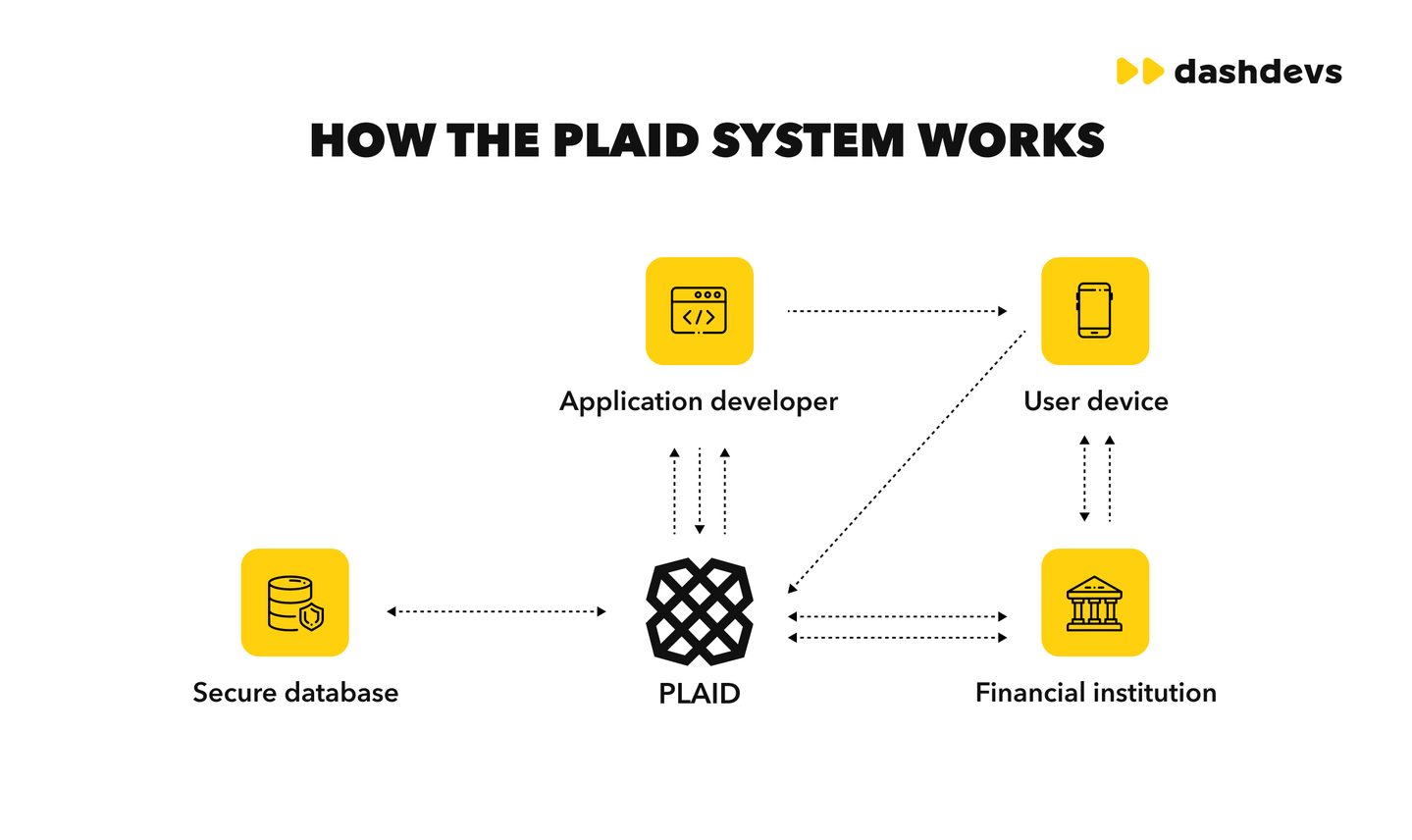
Plaid, for example, lets fintech apps connect to a user’s accounts at other financial institutions without building a connector to every bank individually.
Open Banking does something similar for free, and adoption among digitally active UK consumers has grown fast, with 1 in 5 UK consumers now using Open Banking APIs, up from 1 in 17 just four years earlier.
The system you’re connecting to matters as much as the API you’re using.
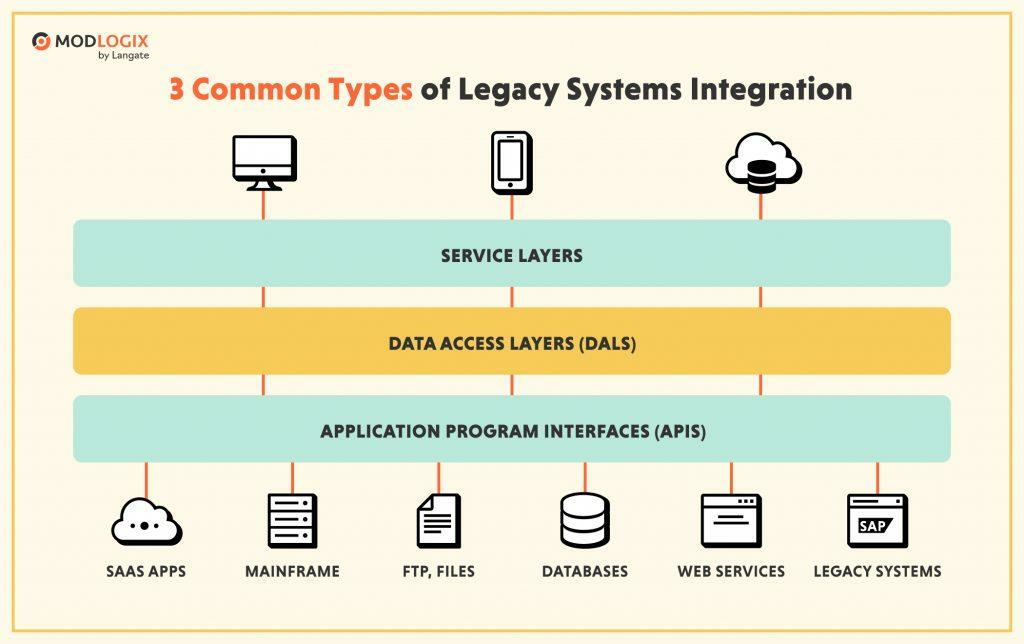
Legacy systems are the most expensive integration target, because older infrastructure is often closed off, doesn’t support modern APIs, and has its own security and compliance baggage.
This is very common in financial services and other regulated industries trying to modernize.
Custom integration work against a legacy system, things like building a new API layer or a data access layer (DAL), typically costs $5,000 to $35,000 or more, depending on how closed off the underlying system is.
Cloud-to-cloud integrations are far cheaper, often starting around $4,000, since most cloud platforms already expose APIs built for exactly this purpose.
We’ve built integration layers on top of genuinely difficult legacy infrastructure, including a real-time railroad reservation platform for Norfolk Southern that now handles 400,000+ daily reservations and saved the company millions in operational costs.
Legacy integration is hard, but it’s rarely the reason a project should be delayed indefinitely.
Database migration
If your new software needs to import data from an older system, budget for migration from the start.
Migration is rarely a clean copy-paste job.
A developer needs to write scripts to handle it, and several factors push the price up:
Data quality – Incomplete or inconsistently formatted data needs cleaning before it can be imported.
Migration script complexity – Messy or incompatible source systems require more custom scripting.
Downtime – Your current system may need to go offline temporarily, which has its own cost.
Format incompatibility – Moving between fundamentally different database systems adds engineering overhead.
The size of the dataset matters less than the state it’s in.
A million clean, well-structured records can move faster than a hundred thousand messy ones. That’s why we quote migration only after we’ve looked at the actual data.
Ongoing maintenance and support
Once your software is live, it costs money to keep it running. That cost never goes away, and it belongs in the budget from the start.
Industry benchmarks consistently put annual maintenance and support at 15-25% of development cost, every year, for the life of the product.
On a $200,000 development budget, that comes out to $30,000 to $50,000 a year.
Maintenance covers four different kinds of work, and they don’t cost the same:
Corrective – Fixing bugs and defects that show up in production. The most visible type, and usually the smallest share of the bill.
Adaptive – Updating the software when something it depends on changes. New iOS and Android releases, browser updates, third-party API changes, cloud provider deprecations.
Perfective – Improving what already works. Performance tuning, usability fixes, small features driven by how people actually use the product.
Preventive – Reducing the cost of future work. Dependency upgrades, refactoring, test coverage, paying down technical debt before it compounds.
Adaptive and preventive work is where a lot of companies underspend, because neither produces anything a user can see. But, skip them long enough and you get the version of maintenance nobody wants: a forced re-platform, or a rewrite.
A few things push the annual number toward the top of that range:
Heavy third-party integrations – More moving parts outside your control, each on someone else’s release schedule.
Mobile apps – Two operating systems, each with its own annual release and deprecation cycle.
Older codebases with thin test coverage – Every change costs more to make safely.
We build this into every proposal from day one.
If you plan for the first year of support before development starts, you can make decisions about it calmly. If you don’t, you make them under pressure, at whatever price is available at the time.
Compliance and security requirements
If you’re building software for a regulated industry like fintech, healthcare, or insurance, security and compliance are baseline costs from day one. They shape the architecture, not just the final checklist.
The requirement usually comes from a specific regulatory framework, and each one has its own price tag:
GDPR – Consent handling, data residency, deletion and export flows, a documented processing record.
HIPAA – Encrypted storage and transfer, strict access controls, audit logging on every record.
SOC 2 – Documented controls plus an observation window, usually three to twelve months before you hold the report
Two costs sit underneath all of them.
The engineering work: role-based access, encryption, audit trails, secrets management, and the tests that prove each one behaves.
And the evidence work: policies, documentation, and someone’s time spent producing it.
A commonly cited range puts annual security audits at roughly $10,000 to $20,000 for an actively maintained product, on top of whatever certification your industry requires. Penetration testing is usually billed separately.
Retrofitting is where this gets expensive. Say you need an audit log, a record of who changed what and when.
If the system was built without one, someone has to go back through every part of the code that writes data and add it.
This is one reason certifications matter when you’re choosing a development partner. We’re ISO 27001 certified, the international standard for information security management, so our security practices are independently audited rather than self-reported.
If you handle sensitive data, confirm your partner holds the same or similar certificate before you sign.
Discovery and scoping
Before any of the numbers above mean anything, someone has to define what’s being built. That’s discovery, and on most projects it’s budgeted separately.
The reason is simple. An estimate is only as good as the requirements behind it, and at the start of a project those requirements are usually a mix of confirmed facts, assumptions, and open questions nobody has separated out yet.
Discovery is where you separate them. A typical engagement produces:
A prioritized scope – What get built first, what waits, and what gets cut.
A technical approach -Architecture, stack, and the integrations the product depends on.
Identified risks – The legacy system nobody has documented, the third-party API with rate limits, the data that turns out to be messier than expected.
An estimate you can plan against – Built on tested requirements rather than a wishlist.
Skipping discovery doesn’t save money, it just moves the cost.
Bad assumptions don’t disappear, they get found by the engineers who have to work around them, and by then you’re paying to undo work you already paid for.
A standalone product discovery and scoping engagement typically runs $20,000 to $50,000, or $100,000 to $150,000 when it’s combined with a minimum viable product (MVP) build.
We run discovery as its own service, separate from development, because it works better when its outcome isn’t predetermined.
A few weeks of proper scoping is consistently cheaper than the alternative, and sometimes it tells you the project shouldn’t go ahead at all.
Custom software development cost: FAQs
We design every custom solution with integration in mind.
We analyze your current systems, design APIs where needed, and make sure your new solution works smoothly with CRMs, ERPs, payment systems, or other third-party tools you rely on.
It depends on the complexity and how well it’s adopted.
A simple tool can pay for itself in months.
A mid-sized system usually takes 6-18 months.
Large-scale enterprise software might take 2-3 years to deliver a return
It can take from months to years depending on complexity, adoption success and other factors, but when it’s done right, it pays huge dividends in the long run.
It depends on how you work and your specific needs.
Off-the-shelf software is faster and cheaper to get started with, especially for common use cases.
But if you have complex workflows or you’re building something new, like a digital health product or software for a specialized clinic, custom software will be a much better fit.
Well, then something went wrong. The most common issues are:
Lack of clear goals – If you don’t define success, you won’t achieve it.
Poor adoption – If your employees aren’t using it, it won’t generate value.
Too many unnecessary features – Feature bloat slows things down and creates new inefficiencies.
Not tracking performance – If you don’t measure results, you can’t improve them.
The solution is analyzing your metrics and user feedback to find the weak spots you can then optimize.
Want to know how much your custom software will cost?
Unfortunately, sometimes there’s no escaping the fact that software development is expensive, especially if you want the best results.
That’s why the best thing to do is to ensure you get what you pay for!
And teaming up with the right software development team like DECODE can help you get the best return on your investment.
Have a project lined up? Feel free to reach out, we’ll take a look at your project and tell you exactly how much it would cost.
A seasoned software engineering executive, Marin’s role combines his in-depth understanding of software engineering processes (particularly mobile) with product and business strategies. Humbly boasting 20+ years of international experience at the forefront of telecoms, Marin knows how to create and deliver state of the art software products to businesses of all sizes. Plus, his skills as a lifelong basketball player mean he can lead a team to victory.
When he’s not hopping from meeting to meeting, you’ll find Marin listening to indie rock, or scouring the latest IT news.
A practical guide to legacy software modernization for CTOs. Compare approaches, understand costs, and learn how to structure programs that actually succeed.
Want to know how to measure ROI of your custom software solution? We've got you covered - you'll find out how to do it, key metrics to track, and more.