Picking a cross-platform framework is a decision you’ll live with for years. You’ll hire for it, build your release process around it, and inherit its upgrade cycle.
All five frameworks have changed a lot since we originally published this article.
React Native now talks to native code directly, Flutter runs on its own rendering engine, and Kotlin Multiplatform can share your UI as well as your logic.
Here, we’ll compare the five frameworks worth evaluating in 2026, what each one does best, and which teams each one suits.
Cross-platform apps run on multiple operating systems, like Android and iOS, from a single codebase. You don’t write separate code for each platform.
That changes how you deliver. Instead of two native teams working in parallel, you get one codebase, one release process, and far less duplicated logic.
The savings can be large. On the eBay Motors app, 98.3% of the code was shared across iOS and Android.
eBay Motors also shows what that does to a timeline. In 2019, a small team had under a year to launch new apps on both Android and iOS, from concept to release.
Two native apps in that time wasn’t realistic. With Flutter, they launched the beta in three months and shipped the full app in 2020.
In a team survey, 70% of developers said Flutter was at least twice as fast as native development.
The top 5 cross-platform frameworks in 2026 are:
Flutter
React Native
Kotlin Multiplatform
.NET MAUI
Ionic
Flutter and React Native are still the two dominant choices. In August 2026, the react-native package recorded 50.2 million monthly downloads on npm, and Flutter’s package registry listed 76,922 packages.
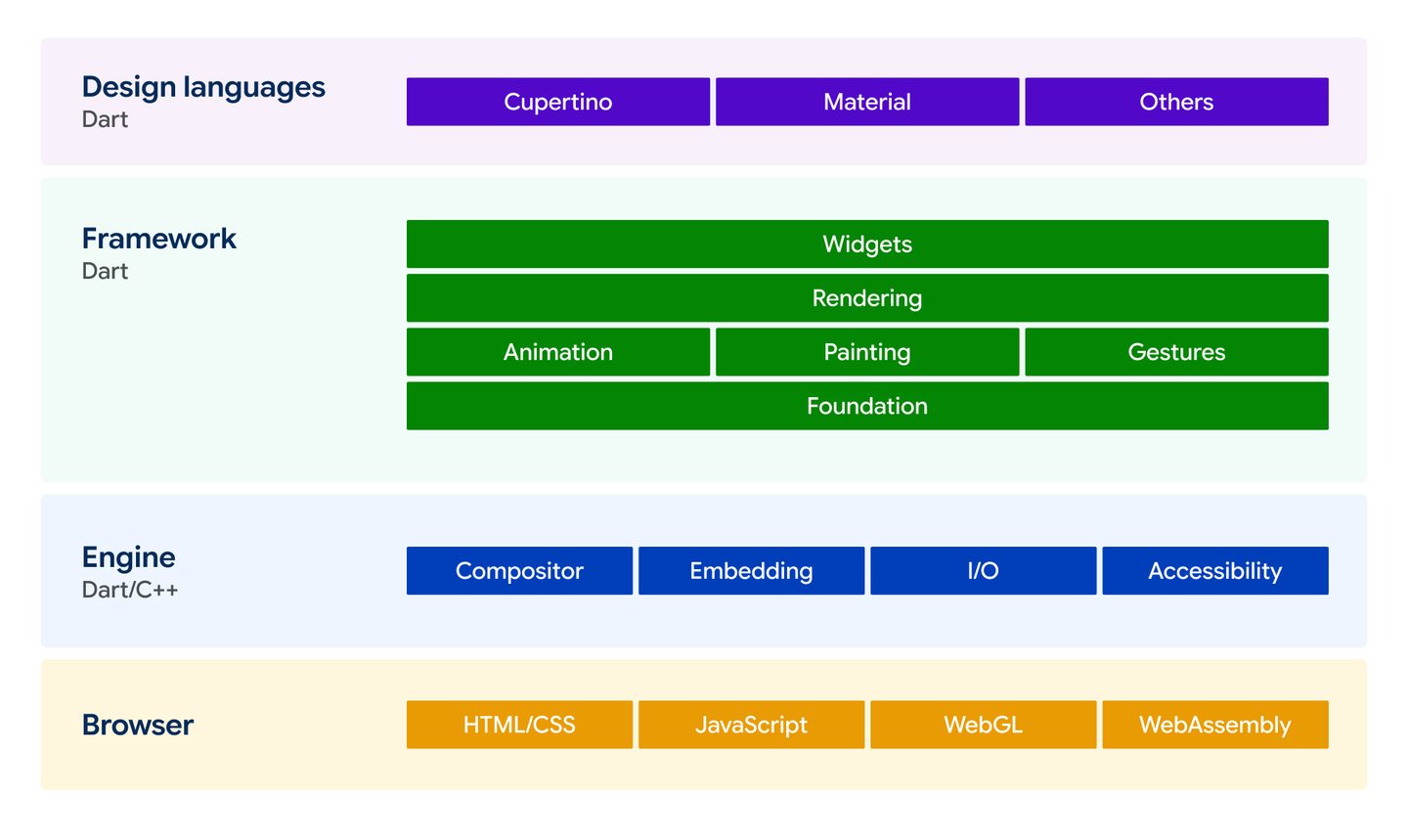
Flutter draws every pixel itself instead of using each platform’s native components.
Its rendering engine, Impeller, is now the default on iOS, Android, and desktop, and it removes the stutter older versions had when compiling shaders.
That’s why Flutter apps look identical on every device. Everything on screen is a widget, from layouts to buttons and text, and you control all of it.
If you’re starting a project now, note one change. Flutter 3.47 moved Material and Cupertino, its built-in Android and iOS design libraries, into separate packages you add on purpose.
Important features
Hot reload
In Flutter, you can see code changes in real-time and you don’t need to restart your app – this can save you a lot of time.
Expressive UI widgets
Flutter has a rich set of customizable widgets with per-pixel Skia rendering for adaptive, polished designs, so you can quickly create great-looking UIs for your app.
Firebase integration
Flutter easily integrates with Firebase, which simplifies backend development.
Native-level performance
Ahead-of-time compilation gives smooth animations and fast startup.
Device access
Platform channels and plugins connect to the camera, sensors, and other device features.
Strong support network
Flutter has a very active community and a huge package library (pub.dev) with a wide range of plugins and pre-built solutions.
Flutter pros and cons
Pros
Reusable UI components
Fast development
Strong community
Native-like performance
Cons
Larger app size
Extra work to match native widget behavior exactly
High resource use
Apps built with Flutter
Some of the top apps built with Flutter, listed on Google’s showcase, are:
Google Pay (India and Singapore)
Alibaba
BMW
eBay Motors
Wolt
NotebookLM
Choose Flutter when your app’s interface is a big part of the product and you want it to look the same everywhere.
Expo handles native setup, cloud builds, and over-the-air updates on top of standard React Native. Its hosted services are free for small projects and paid at team scale.
Important features
Native components
Your app uses each platform’s real UI components, making it feel just like a native app.
Fast refresh
See code changes instantly while keeping the app’s state.
Extensive ecosystem
React Native can integrate with a huge number of libraries, tools, and frameworks to extend its functionality.
Declarative component model
You can use React paradigms (JSX, props, state) to build a clean, modular UI.
Continuous updates
Hermes engine support, auto-batching, Suspense, TypeScript default, improved bridging – just to name a few.
React Native pros and cons
Pros
Fast development
Code reusability
Community support
Direct native access through JSI
Cons
Complex updates
Difficult debugging
Third-party native modules sometimes lag behind new releases
Apps built with React Native
Some of the top apps built with React Native, listed on the official showcase, are:
Facebook
Instagram
Microsoft Outlook
Microsoft Teams
Amazon Shopping
Shopify
Xbox Game Pass
Choose React Native when your team already works in JavaScript or TypeScript and you want the biggest ecosystem to draw from.
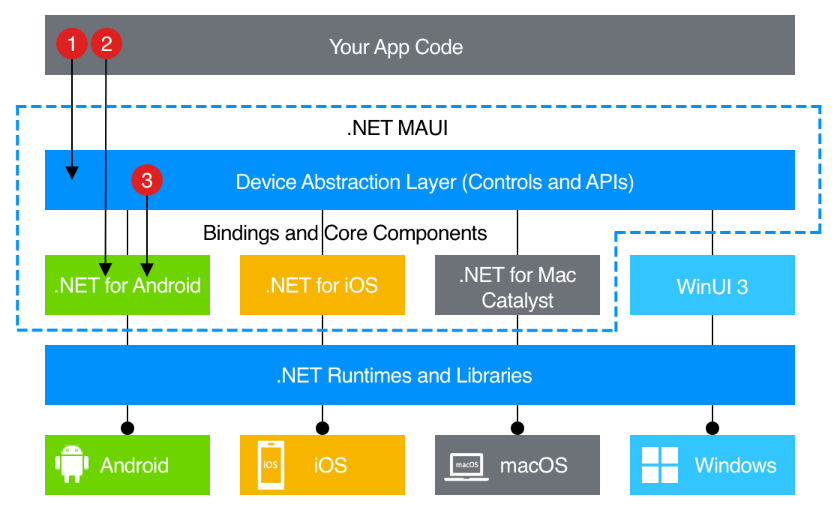
.NET Multi-platform App UI (.NET MAUI) is Microsoft’s framework for building cross-platform apps with C# and .NET.
It’s the successor to Xamarin. One project can target iOS, Android, macOS, Windows, and tvOS, and if your team already works in .NET, there’s no new language to learn.
Kotlin Multiplatform is JetBrains’ open-source technology for sharing Kotlin code across platforms.
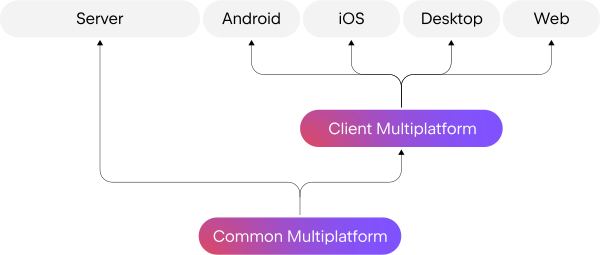
It lets you share business logic, like data models, networking, and business rules, while each platform keeps its native UI. That cuts duplicated code and bugs.
You don’t have to start from scratch. You can add Kotlin Multiplatform to existing apps one module at a time, which makes it a good fit for teams that already have native apps in production.
You can also share the UI.
Compose Multiplatform, built on top of Kotlin Multiplatform, uses Google’s Jetpack Compose to render one interface on iOS, Android, and desktop.
It’s been stable on iOS since May 2025. If your Android team already writes Compose, most of what they know transfers. The web version is still in beta.
Important features
Flexible code sharing
Share only logic, specific modules, or the full UI, depending on what you need.
Interoperability with native code
Shared code calls directly into your existing iOS and Android codebases.
Gradle support
Kotlin Multiplatform supports Gradle, a build automation tool, which simplifies dependency management and improves productivity.
Gradual adoption
You can mix Compose screens into existing SwiftUI and UIKit apps, and move more over as you go
Ionic is an open-source toolkit for building mobile apps with HTML, CSS, and JavaScript.
It’s easy to pick up for web developers and works with Angular, React, and Vue.
Ionic uses Capacitor to access device features like the camera, location, and push notifications.
Your interface still runs inside a web view, a browser window embedded in the app, so complex animations hit limits sooner than in the other four frameworks.
There’s one business change to know about. In February 2025, Ionic stopped selling its commercial products, including the Appflow build service. Existing customers keep Appflow access until December 31, 2027.
The open-source framework is still actively maintained. OutSystems, which owns Ionic, has committed to supporting it and Capacitor. If you rely on Appflow, plan a replacement before the end of 2027.
Important features
Web technologies
Ionic uses HTML, CSS, and JavaScript to build cross-platform mobile apps, so it’s an easy transition for web developers.
Capacitor
Open-source runtime environment that connects your app to native device features.
100+ UI components
Cards, lists, tabs, and more that adapt to iOS and Android design.
Framework flexibility
Works with Angular, React, Vue, or plain JavaScript
Choose Ionic when you have a web team, a content-focused app, and need to ship on mobile quickly.
How to choose the right cross-platform mobile app development framework?
There’s no single best framework. The right one depends on your team, your app, and your long-term plans.
Team expertise
Start with what your team already knows. The more familiar the tech, the faster they can master it.
JavaScript and TypeScript teams – React Native, or Ionic for web-first teams.
Kotlin and Android teams – Kotlin Multiplatform, plus Compose Multiplatform if you write Jetpack Compose.
.NET teams – .NET MAUI.
Teams open to a new language – Flutter, though Dart will be new to almost everyone.
Pick the framework your team can be productive in within weeks.
Performance needs
Most business apps are forms, lists, and screens that load data from a server. Any of the five frameworks handles that well.
If your app relies on complex animations or constantly redraws the screen, Flutter’s rendering engine gives you the most predictable results across devices.
Platform differences
One codebase doesn’t mean identical behavior. Date pickers, keyboards, safe areas, and the back gesture all work differently on iOS and Android.
Emulators also hide problems like overheating, battery drain, and low-memory crashes. Test on real devices on both platforms from the first sprint.
Long-term support
Flutter and React Native both ship on predictable schedules with public roadmaps.
Kotlin Multiplatform has JetBrains and Google behind it.
For .NET MAUI and Ionic, put the support dates in your plan now. MAUI 10 support ends May 11, 2027, and Appflow access ends December 31, 2027.
Neither rules the framework out, but you should know your upgrade path before development starts.
One to watch: Lynx
Lynx, open-sourced by ByteDance in 2025, reached version 4.0 in July 2026 and renders natively on iOS, Android, and web.
Its main production users so far are ByteDance’s own apps, TikTok and CapCut, and its 2026 roadmap lists device APIs and tooling as work in progress.
It’s worth tracking, but it’s early for a client project.
Top cross-platform mobile app development frameworks: FAQs
Very close, especially with Flutter and React Native. Flutter compiles to native code and draws through its own Impeller engine, so performance stays consistent across devices.
React Native now calls native code directly, with no bridge in between. For typical business apps, users won’t notice a difference from native.
For the hardest cases, like real-time video processing or complex 3D, fully native code (Swift or Kotlin) or a game engine like Unity is still the better choice.
It depends on what you need. Flutter gives you more control over the UI and more consistent rendering, because it draws everything itself.
The trade-offs are Dart, which has a smaller hiring pool than JavaScript, and larger app sizes.
React Native uses JavaScript, renders native components, and has a larger ecosystem for third-party integrations. Its main costs are upgrade work and waiting on third-party libraries to catch up.
Choose Flutter for UI control. Choose React Native if your team knows JavaScript and you want to move faster.
React Native is the natural fit. You use the same language, libraries, and tooling you already use on the web, and TypeScript works out of the box.
Most new React Native apps start with Expo, which handles native setup and builds for you.
Ionic is the other option, especially for content-focused apps. It runs in a web view, though, so complex animations will hit limits sooner.
Need a cross-platform app?
Do you have a great idea for an app but want to make it fast, and cost-effective?
Don’t worry, we can help you make it a reality.
We’ll handle your app’s development from start to finish, from validating your idea to post-launch maintenance and updates.
If you want to learn more, check out our approach to mobile app development and feel free to get in touch with us.
When something unusual happens, Vlado is the man with an explanation. An experienced iOS Team Lead with a PhD in Astrophysics, he has a staggering knowledge of IT. Vlado has a lot of responsibilities, but still has time to help everybody on the team, no matter how big or small the need.
His passions include coffee brewing, lengthy sci-fi novels and all things Apple. On nice days, you might find Vlado on a trail run. On rainier days, you’ll probably find him making unique furniture in the garage.
Before developing an app, it’s important to note that there are different technologies you can employ, and be aware of the differences between them
Whether you choose to build a native, hybrid, or cross-platform app, each of these technologies has its own pros and cons, depending on the nature of your project.
In this article, we’ll offer you some insight into native and cross-platform technologies.